
Dequoter 0.1.9
I figured it was time to start releasing some of the small apps I make to assist me. I’ll start with Dequoter, one of the smaller ones. Until today, it was not in a fit enough state to release: the code wasn’t signed, there was no app icon, and certain niceties like dark mode were not working. Those have been addressed, and while I’m not claiming this app to be a marvel of software engineering, I’m releasing it anyway on the off chance that someone else would find it useful.
Download: Dequoter 0.1.9 for MacOS
About
So what is Dequoter? It’s a single buffer text processor, where you can write or paste in text, perform some operation on it — like down-case — and then use that text elsewhere. It’s somewhat similar to Boop if you’re familiar with that. I built it mainly to convert quoted JSON strings into formatted JSON text that I could read (that’s where the name came from), and over time I added a few other processors that I found useful. It’s not as full featured as Boop, and realistically I probably could’ve just implemented what I needed as a Boop extension. But I had a few weekends free, and I figured it would be a small thing I could start and just improve over time. Plus it has a few niceties that Boop doesn’t offer, like multi-cursor support.
Usage
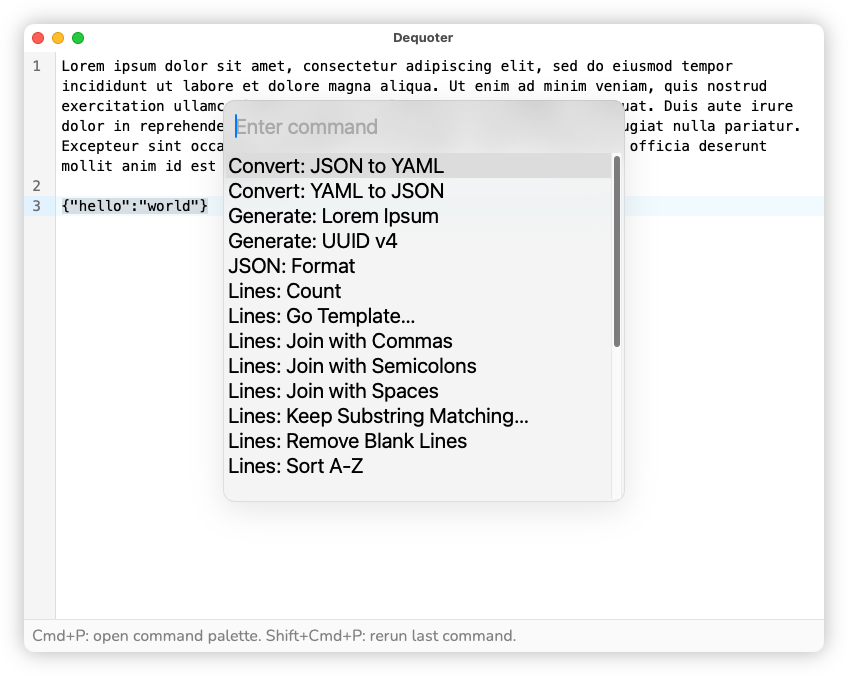
Launching the app will bring you into a text buffer. Write or paste in text from anywhere. To perform an operation, press Cmd+P. This will bring up a picker of processors you can invoke. Start typing to filter and press Enter to invoke the one that appears on the top. The processor will apply to the contents of the buffer, or if any text is selected, it will only apply to the selected text.
The processor name gives a hint as to how the processor handles the text, or “input”. For example, processors beginning with Lines will operate on a per-line basis, where-as String will operate on the input as a whole. Some, like Lines: Count will actually calculate a value, which will appear in the status bar. Others, like Generate: Lorem Ipsum won’t take any input at all, and will instead produce text at the caret. Processors that have a trailing … will require an additional argument, that you’ll be prompted to provide when selecting.
Undo is supported, so you can back out of any transformations by pressing Cmd+Z. To repeat the last invoked processor, press Shift+Cmd+P.
The rest is just the regular text editing features you know and love. The app uses Coding Mirror so if you know the key bindings for that, you’ll be right at home. Multi-caret support is enabled, and to spawn a new caret, press either Opt+Ctrl+Up or Opt+Ctrl+Down.
Tech Stack
If it isn’t obvious, this is not a Mac-arsed Mac app. This was built using Wails, which could be described as Electron for Go. However, the apps built with Wails used the built-in HTML renderer, rather than bundle Chromium, so they end up being a fair bit smaller. The text editor used is Code Mirror. Much of the core is hand rolled, although I’ve started using coding agents for the more recent changes, especially the processors. The logo was made using Affinity Designer.
Anyway, if you’re looking for a simple text processor, give this a try. I hope you find it useful.