
The Compartmentaliser's Survival Guide To Obsidian Bases
It took me a while, but I think I’ve finally gotten comfortable with using Obsidian Bases. I dabbled for a bit here and there in the past, but a system didn’t really work for me until recently. The biggest issue I had was learning to deal with tags, and that since Bases worked over the entire vault, there is effectively a single tag namespace. You could use a status tag for release notes, but what if you also wanted to represent a status for roadmap items? Should you use the same status tag for that?
This didn’t appeal to me initially: what appears in my vault covers a wide range of topics. But I made it work using the following techniques:
- Put the Base and its items in the same folder.
- Use a distinct naming convention for each of the base items.
- Use a namespace prefix for all the tags that will appear in the base.
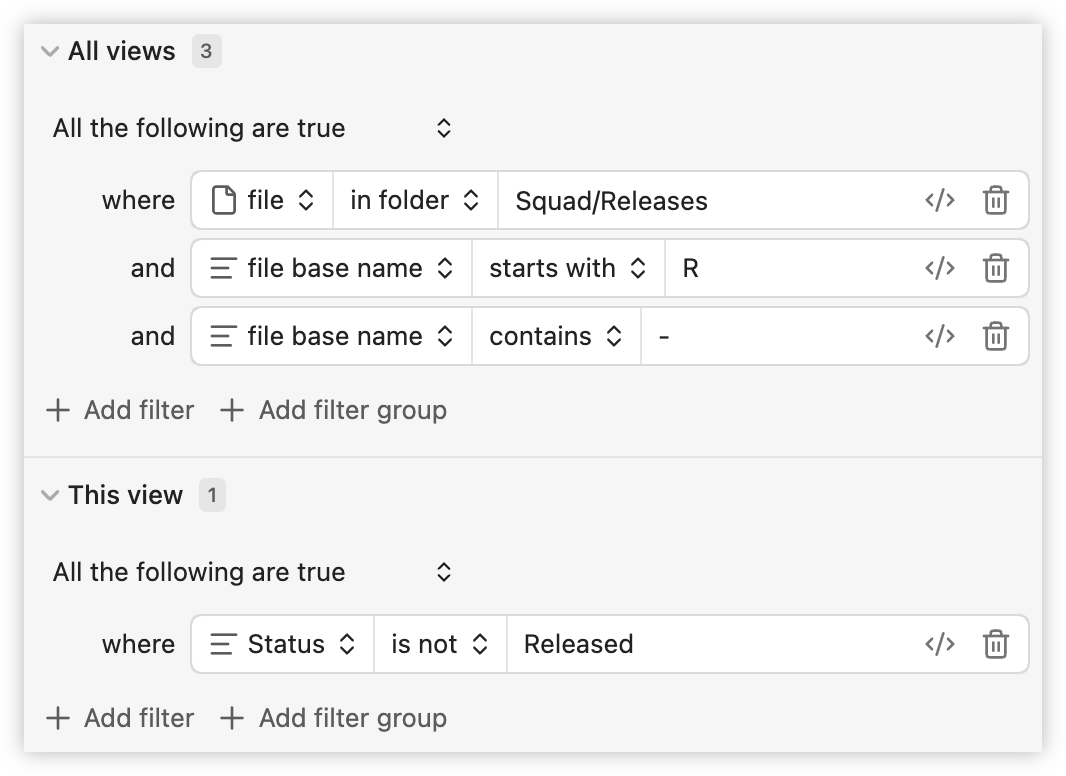
For example, here’s my Base filter configuration for items tracking releases. The Base itself has the name “Pending Releases” and each individual item has the name “Rx - Name” where x is a monotonically increasing integer, e.g. R2 - Release New Thing. The prefix was strategically chosen such that the Base appears as the first item in folder (you could use “_Base Name” but that is really ugly). I’ve also got it bookmarked so I can quickly open it elsewhere. Each item has tags that begin with rel., for example rel.status. This means it won’t clash with tags for work stream items, which have rm.status (rm. is for “roadmap”).
So far this has been working quite well. But it’s still early days: I’ve got less than 10 items in each Base at the moment. Also, I’m not entirely sure what I’ll do about completed entries. They’re hidden from the Base but I don’t know what to do with the completed note, whether to delete or hide. A problem for later, perhaps.