
-
Things Dynamo-Browse Need
I’m working with dynamo-browse a lot this morning and I’m coming up with a bunch of usability shortcomings. I’m listing them here so I don’t forget.
The query language needs an
Continue reading →inoperator, such aspk in ("abc", "123"). This works likeinin all the other database services out there, in that the expression effectively becomes `pk = “abc” or pk = “123”. Is this operator supported natively in DynamoDB? 🤔 Need to check that. -
Overlay Composition Using Bubble Tea
Working on a new feature for Dynamo-Browse which will allow the user to modify the columns of the table: move them around, sort them, hide them, etc. I want the feature to be interactive instead of a whole lot of command incantations that are tedious to write. I also kind of want the table whose columns are being manipulated to be visible, just so that the affects of the change would be apparent to the user while they make them.
Continue reading → -
Intermediary Representation In Dynamo-Browse Expressions
One other thing I did in Dynamo-Browse is change how the query AST produced the actual DynamoDB call.
Previously, the AST produced the DynamoDB call directly. For example, if we were to use the expression
pk = "something" and sk ^= "prefix", the generated AST may look something like the following: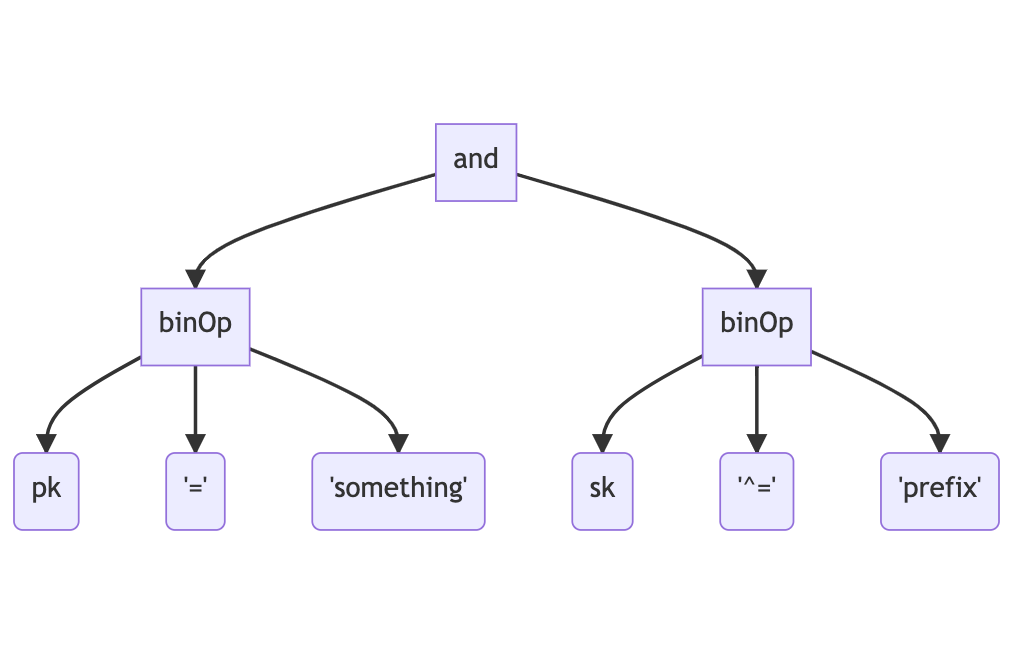
The AST will then be traversed to determine whether this could be handled by either running a query or a scan. This is called “planning” and the results of this will determine which DynamoDB API endpoint will be called to produce the result. This expression may produce a call to DynamoDB that would look like this:
Continue reading → -
Letting Queries Actually Be Queries In Dynamo-Browse
I spent some more time working on dynamo-browse over the weekend (I have to now that I’ve got a user-base 😄).
No real changes to scripting yet. It’s still only me that’s using it at the moment, and I’m hoping to keep it this way until I’m happy enough with the API. I think we getting close though. I haven’t made the changes discussed in the previous post about including the builtin
Continue reading →pluginobject. I’m thinking that instead of a builtin object, I’ll use another module instead, maybe something like the following: -
Finished version 0.0.3 of Audax Toolset yesterday. The code has been ready since the weekend, but it took me Sunday morning and yesterday (Monday) evening to finish updating the website. All done now.
Now the question is whether to continue working on it, or do something different for a change. There are a few people using Dynamo-Browse at work now, so part of me feels like I should continue building features for it. But I also feel like switching to another project, at least for a little while.
I guess we’ll let any squeaky wheels make the decision for me.
devlog -
I’ve been using Dynamo-Browse all morning and I think I’ll make some notes about how the experience went. In short: the command line needs some quality of life improvements. Changing the values of two attributes on two different items, while putting them to the DynamoDB table each time, currently results in too many keystrokes, especially given that I was simply going back and forth between two different values for these attributes.
So, in no particular order, here is what I think needs to be improved with the Dynamo-Browse command line:
- It needs command line completion. Typing out a full attribute name is so annoying, especially considering that you need to be a little careful you got the attribute name right, lest you actually add a new one.
- It needs command line history. Pressing up a few times is so much better than typing out the full command again and again. Such a history could be something that lives in the workspace, preserving it across restarts.
- The
set-attranddel-attrcommands need a switch to take the value directly, rather than by prompting the user to supply it after entering the command (it can still do that, but have an option to take it as a switch as well). I think having a-setswitch after the attribute names would suffice.
Finally, I think it might be time to consider adding more language features to the command line. At the moment the commands are just made up of tokens, coming from a split on whitespace characters (while supporting quotes). But I think it may be necessary to convert this into a proper language grammar, and add some basic control structures to it, such as entering multiple commands in a single line. It doesn’t need to be a super sophisticated language: something similar to the like TCL or shell would be enough at first.
It might be that writing a script would have solved this problem, and it would (to a degree at least). But not everything needs to be a script. I tried writing a script this morning to do the thing I was working on and it felt just so overkill, especially considering how short-lived this script would actually be. Having something that you can whip up in a few minutes can be a great help. It would have probably taken me 15-30 minutes to write the script (plus the whole item update thing hasn’t been fully implemented yet).
Anyway, we’ll see which of the above improvements I’ll get to soon. I’m kinda thinking of putting this project on hold for a little while, so I could work on something different. But if this becomes too annoying, I may get to one or two of these.
devlog -
Thinking About Scripting In Dynamo-Browse
I’ve been using the scripting facilities of dynamo-browse for a little while now. So far they’ve been working reasonably well, but I think there’s room for improvement, especially in how scripts are structured.
At the moment, scripts look a bit like this:
const db = require("audax:dynamo-browse");
const exec = require("audax:x/exec");

db.session.registerCommand("cust", () => {
    db.ui.prompt("Enter UserID: ").then((userId) => {
        return exec.system("/Users/lmika/projects/accounts/lookup-customer-id.sh", userId);
    }).then((customerId) => {
        let userId = output.replace(/\s/g, "");
        return db.session.query(`pk="CUSTOMER#${customerId}"`, {
            table: `account-service-dev`
        });
    }).then((custResultSet) => {
        if (custResultSet.rows.length == 0) {
            db.ui.print("No such user found");
            return;
        }
        db.session.resultSet = custResultSet;
    });
});
This example script — modified from one that I’m actually using — will create a new
Continue reading →custcommand which will prompt the user for a user ID, run a shell script to return an associated customer ID for that user ID, run a query for that customer ID in the “account-service-dev”, and if there are any results, set that as the displayed result set. -
Dynamo-Browse: Using The Back-Stack To Go Forward
More work on Audax toolset. Reengineered the entire back-stack in dynamo-browse to support going forward as well as backwards, much like going forward in a web-browser. Previously, when going back, the current “view snapshot” was being popped off the stack and lost forever (a “view snapshot” is information about the currently viewed table, including the current query and filter if any are set). But I’d need to maintain these view snapshot if I wanted to add going forward as well.
Continue reading → -
Adding Copy-To-Clipboard And Layout Changes In Dynamo-Browse
Spent some more time on dynamo-browse this morning, just a little bit.
Got one new feature built and merged to main, which is the ability to copy the displayed item to the pasteboard by pressing c. This is directly inspired by a feature in K9S, which allows you to copy the logs of a running pod to the pasteboard (I use this feature all the time). The package I’m using to access the pasteboard is github.com/golang-design/clipboard, which seems to offer a nice cross-platform approach to doing this.
Continue reading → -
Adding A Back-Stack To Dynamo-Browse
Spent some more time working on dynamo-browse, this time adding a back-stack. This can be used to go back to the previously viewed table, query or filter by pressing the Backspace key, kind of like how a browser back button works.
This is the first feature that makes use of a workspace, which is a concept that I’ve been thinking about since the start of the project. A workspace is basically a file storing various bits of state that could be recalled in future launches of the tool. A workspace is always created, even if one is not explicitly specified by the user. The workspace filename be set by using the
Continue reading →-wswitch on launch, or if one is not specified, then a new workspace filename within the temp directory is generated. The workspace file itself is a Bolt database, which is a very simple, embeddable key/value store that uses B-Trees and memory-mapped data access. I’m actually using StormDB to access this file, since it provides a nice interface for storing and querying Go structs without having to worry about marshalling or unmarshalling. -
More On Scripting In Dynamo-Browse
Making some more progress on the adding scripting of dynamo-browse. It helps being motivated to be able to write some scripts for myself, just to be able to make my own working life easier. So far the following things can be done within user scripts:
- Define new commands
- Display messages to, and get input from, the user
- Read the attributes of, and set the attributes of, the currently selected row (only string attributes at this stage)
- Run queries and get result sets, which can optionally be displayed to the user
Here’s a modified example of a script I’ve been working on that does most of what is listed above:
Continue reading → -
Scripting In Dynamo-Browse
Making some progress with adding scripting capabilities to dynamo-browse. I’ve selected a pretty full-featured JS interpreter called goja. It has full support for ECMAScript 5.1 and some pretty good coverage of ES6 as well. It also has an event loop, which means that features such as
Continue reading →setTimeoutand promises come out of the box, which is nice. Best of all, it’s written in Go, meaning a single memory space and shared garbage collector. -
Release Preparation & Next Steps
Finally finished the website for the Audax toolset and cut an initial release (v0.0.2). I’ve also managed to get binary releases for Linux and Windows made. I’ve started to work on binary releases for MacOS with the intention of distributing it via Homebrew. This is completely new to me so I’m not sure what progress I’ve made so far: probably nothing. For one thing, I’ll need a separate machine to test with, since I’ve just been installing them from source on the machine’s I’ve been using. Code signing is going to be another thing that will be fun to deal with.
Continue reading → -
A New Name for Audax Tools (nee AWS Tools)
I think I’ve settled on a name for the project I’ve been calling “awstools”. “Settled” is probably a good word for it: I came up with it about a week ago, and dismissed it at first as being pretty ordinary1. But over that time, it’s been slowly growing on me. Also, I’ve yet to come up with any alternatives that are better.
Anyway, the name that I’ve settled on is the Audax Toolset.
Continue reading → -
AWS Tools: Documentation & The Website
Worked a little more on “awstools” (still haven’t thought of a good alternative name for it). I think the “dynamo-browse” tool is close to being in a releasable state. I’ve spent the last couple of days trying to clean up most of the inconsistencies, and making sure that it’s being packaged correctly.
Now it’s documentation writing time. I’m working my way through a very basic website and user guide. It’s been a little while since I’ve written any form of user-level documentation — most of the documents I write have been for other developers I work closely with — and I admit that it feels like a bit of a slog. It might be the tone of writing that I’ve adopted: a little dry and impersonal, trying to walk that fine line between being informative without swamping the reader with big blocks of words. I might need to work on that: no real reason why the documentation needs to be boring to the reader.
Continue reading → -
AWS Tools Dev Diary
A little more work on “awstools” today, mainly on a bit of a cleanup spree to make them suitable for others to use. This generally means fixing up any inconsistencies in how the commands work. An example of this is the
Continue reading →putcommand, which now writes all modified items that are marked to the table (or if there are no marked items, all modified items) instead of just the selected one. This brings it closer to how thedeletecommand works. -
WWDC Videos In Broadtail
Some more work on Broadtail. This time, I added the ability to use it to download Apple WWDC videos.
The way it works is based on the existing RSS feed concept. In order to get the list of videos for a particular WWDC year, you “subscribe” to that by setting up a feed with the new “Apple Developer Videos” type. The external ID is taken from the URL slug of the web-site that Apple publishes the session videos. For example, for WWDC 2021, the external ID would be “wwdc2021”.
Continue reading → -
Feed Rules In Broadtail
Generally, when there’s a video that I’m interesting in watching, I take a look at Broadtail to see if it’s available. When it is, I go ahead and download it.
However, some videos take a long time to download — we’re talking 10 hours or so — and they’re usually published when I’m not looking, like during the night when I’m asleep (thank’s time-zones). So I’d thought it would be nice for Broadtail to kick off the download for me when the video shows up in the feed.
Continue reading → -
Doing a small weekend/week-long project at the moment to track favourite moments in a few podcasts I’m listening to. This is something that I’ve been thinking about for a while, and I’m not entirely sure what compelled me to actually start work on it. Probably because the system I’ve been using so far — a set of timestamped Pocketcast links managed in Pinboard — has been growing quite recently and much of the limitations involved, such as the list being unordered and no skip back 30 seconds available on playback, is start to annoy me. It’s also a chance for a bit of novelty, at least for a few days or so.
It took roughly a day or so to get a small Buffalo web-app up and running which does most of what I want. It just needs some styling and a better way to play the episodes, which is what I’m working on now. I really don’t want to spend more than a week working on this — last thing I need are more projects. But a good thing about this one is that I think the scope is naturally quite small, so no real risk of it blowing out to become too large.
devlog -
Two new awstool commands: one for browsing SSM parameters and one for simply viewing JSON log files. The SSM parameter one was especially handy, as I was dealing with parameter subtrees a lot and doing that in the AWS web console is always a pain. As for the JSON log viewer; well, let’s just say there were one too many log files from Kubernete pods I needed to look at this week.
The pattern for working with state seems to be working. I may need to be a little careful that the state management doesn’t get too unwieldily as I add features and more things that need to be tracked. But at the moment, it seems to be manageable.
devlog -
I’ve been racking my brain trying to best work out how to organise the code for awstools. My goals are to make it possible to have view models composable, have state centralised but also localised, and keep controllers from having too much responsibility. I started another tool, which browses SSM parameters, to try and work this all out.
I think I’ve settled on the following architecture:
- Providers and Services will remain stateless
- State will be managed by controllers
- Operations in controllers are only available through tea.Cmd implementations.
- Updates from controllers will only be available through tea.Msg implementations.
- View models (i.e.
tea.Model) will only know enough state to be able to render themselves. - There will be one master model which will coordinate the communication between controllers and view models. This model will react to messages from the controllers and update the views. It will also react to messages from the views and launch operations on the controllers.
We’ll see how this goes and whether it will scale as additional features are added.
devlog -
More work on the AWS tools, mainly rebuilding the UI framework. Need to rip out all the Operation type stuff, as BubbleTea already does this using messages and commands (see tutorial 2). Also taking some time building some UI models that I can reuse across the various commands, including a few that deal with layout changes.
Also tracked down what was causing that delay when trying to create a new list. It turns out during the call to
list.New(), a bunch of adaptive styles are created, which includes a test to see if the terminal is in light or dark mode. This calls some terminal IO methods which were blocking for a significant amount of time, we’re talking in the order of 10’s of seconds.The good thing is that this check is only made once, so what I did was move the check into the main function. Some preliminary tests indicating that this may work: the lists are consistently being created very quickly again. We’ll see if this lasts.
devlog -
More work on Broadtail this morning. Managed to get the new favourite stuff finished. Favourites are now a dedicated entity, instead of being tied to a feed item. This means that any video can now be favourited, including ones not from a feed. The favourite list is now a top-level menu item as well.
Also found a useful CLI tool for browsing BoltDB files.
devlog -
New AWS Tools Commands
For a while now, I’ve been wanting some tools which would help manage AWS resources that would also run in the terminal. I know in most circumstances the AWS console would work, but I know for myself, there’s a lot of benefit from doing this sort of administration from the command line.
I use the terminal a lot when I’m developing or investigating something. Much of the time while I’m in the weeds I’ve got a bunch of tabs with tools running and producing output, and I’m switching between them as I try to get something working across a bunch of systems.
Continue reading → -
Even more work on Feed Journaler. Still trying to tune the title removal logic. Will probably require a lot of testing.
devlog