
-
Spent most of the weekend going down various rabbit holes to get a Go application signed and notarised as a MacOS app. I’m trying to do this in a way that would make this easy to automate using GitHub Actions. This means things like no implicit access to the system keychain: I want to make a temporary keychain, add my secret stuff to it, then delete it once signing and notarisation is done.
It also means no XCode GUI either: command line stuff only. Not that I had much hope of using XCode here anyway, since this is a Go application.
But that’s fine, preferable even. I’ve never liked all the manual steps needed to get code signing work with XCode. What are you going to do when you change systems? Would you remember all the steps you took several years ago, when you last setup developer certificates?
So this is why I’m trying to get it working with the terminal. But it’s not easy. Lots of esoteric commands that I need to learn and be made aware of. Just hope it’s not a huge waste of time.
devlog -
I’ve been working on Micropub Checkins over the last week. It’s been a bit of a rush trying to get it into a usable state for an upcoming trip. And by “usable”, I mean a form that I can tolerate, and when it comes to projects like this, I can tolerate quite a lot. It can have a really dodgy UI (which this does) and miss some really important features that are annoying to work around; but if it works, and doesn’t loose data, I’ll be fine with it.
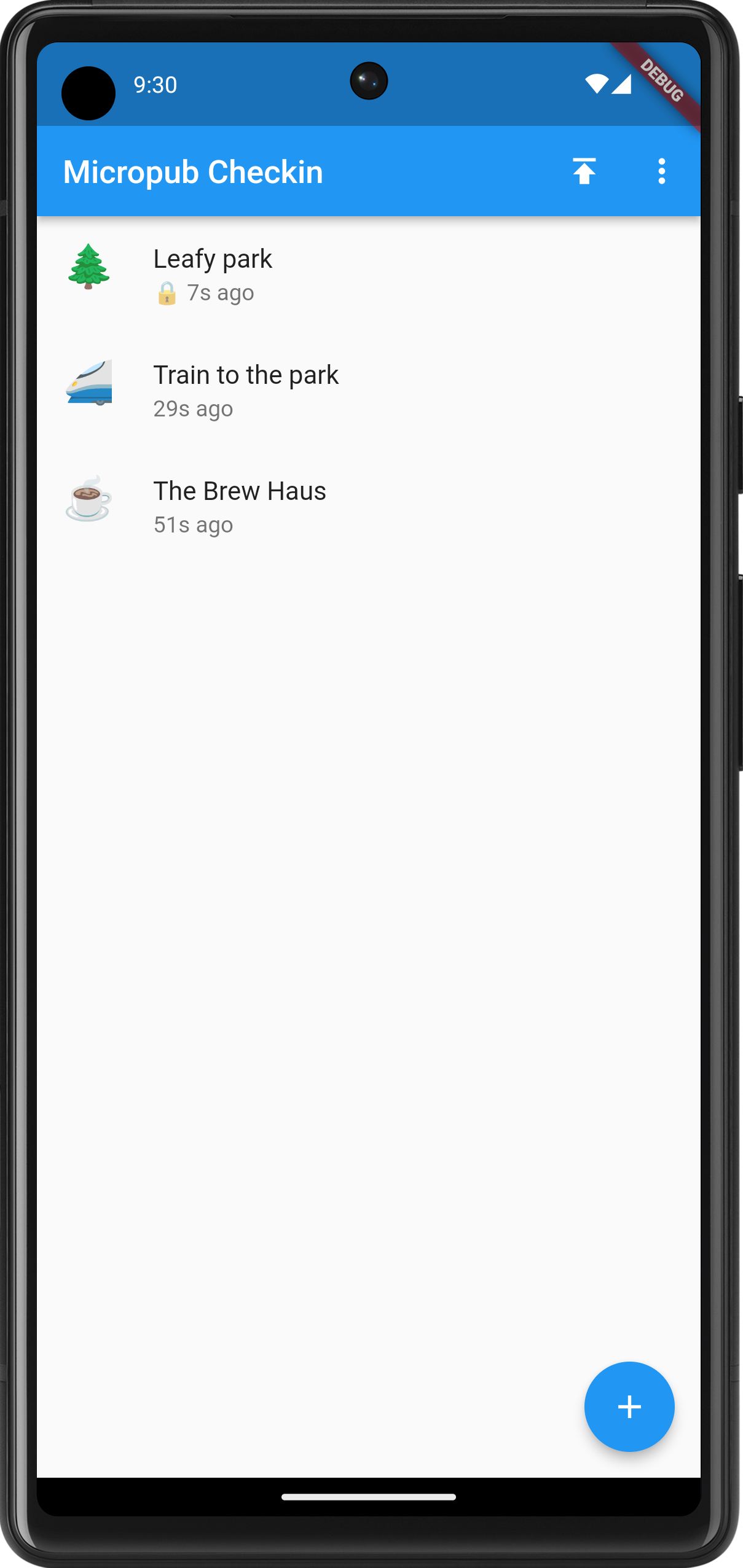
The main screen showing the recent check-ins. Note the lock next to some of them. These won't be published until the locks are removed. The last week was dedicated to making the act of checking in distinct from publishing it. Until now, check-ins were published the minute they were entered, meaning that you cannot check-in somewhere unless you’re comfortable with people knowing where you are the minute you do. Yes, some people like it that way, but not me. And I’m aware that this’ll only be the case if people are following my check-in blog, which I’m doubtful of.
So pressing the floating action button and choosing a check-in type now starts the flow of a new check-in that will get saved in an SQLite database. You can edit the check-in whenever you like, so long as it’s not published. Currently there’s no real way of deleting a check-in unless it’s been published. This is a bit dodgy, but it’s a good example of how tolerant I am with working around these feature gaps for the moment.
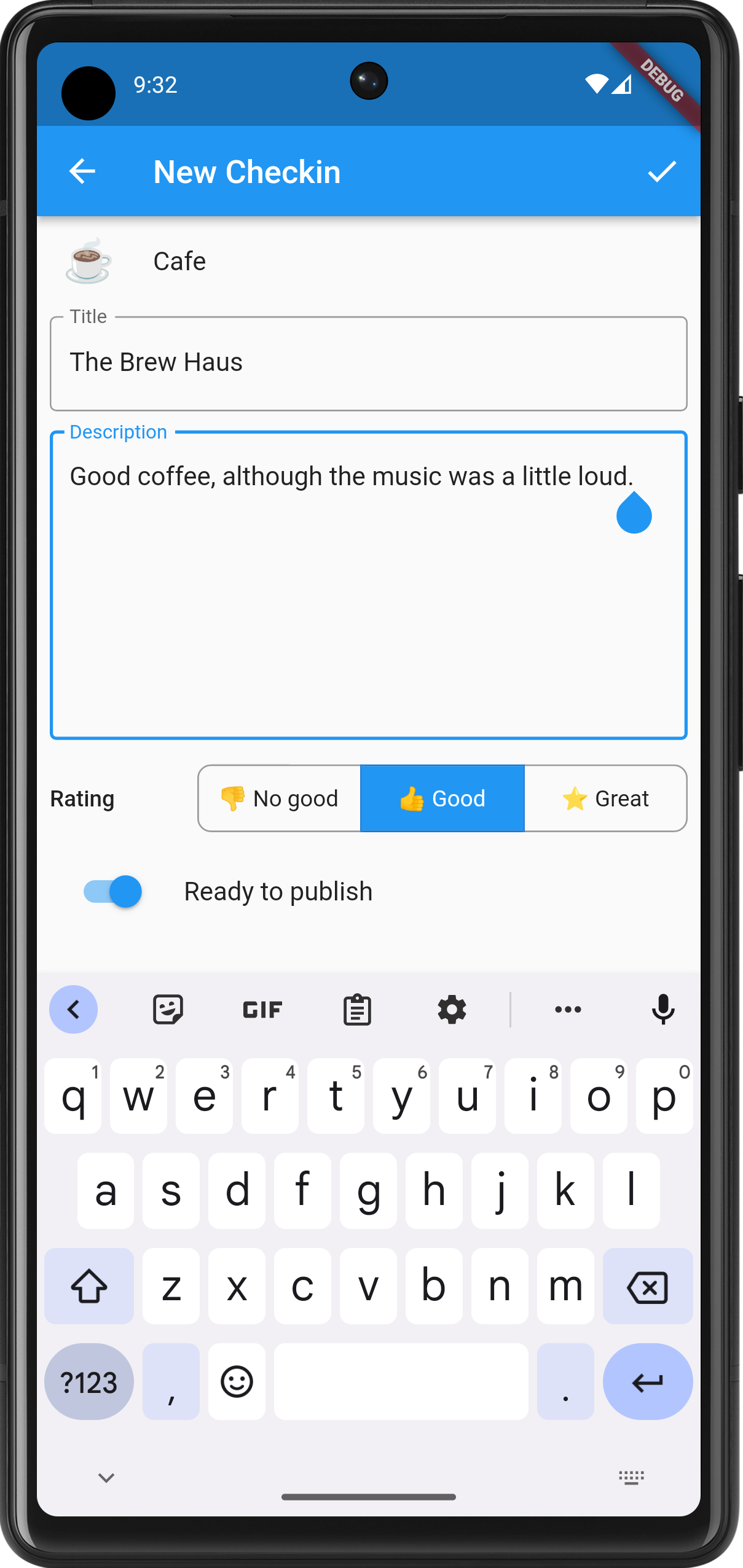
The newly styled edit screen. Notice the rating field, which will appear for eateries. Check-ins can be published by tapping the upward facing button on the main screen. Any check-in with a lock is private and will not be published until you toggle the “Ready to publish” switch in the properties. Doing so will not change the date of the check-in: it will still have the date and time that check-in was created.
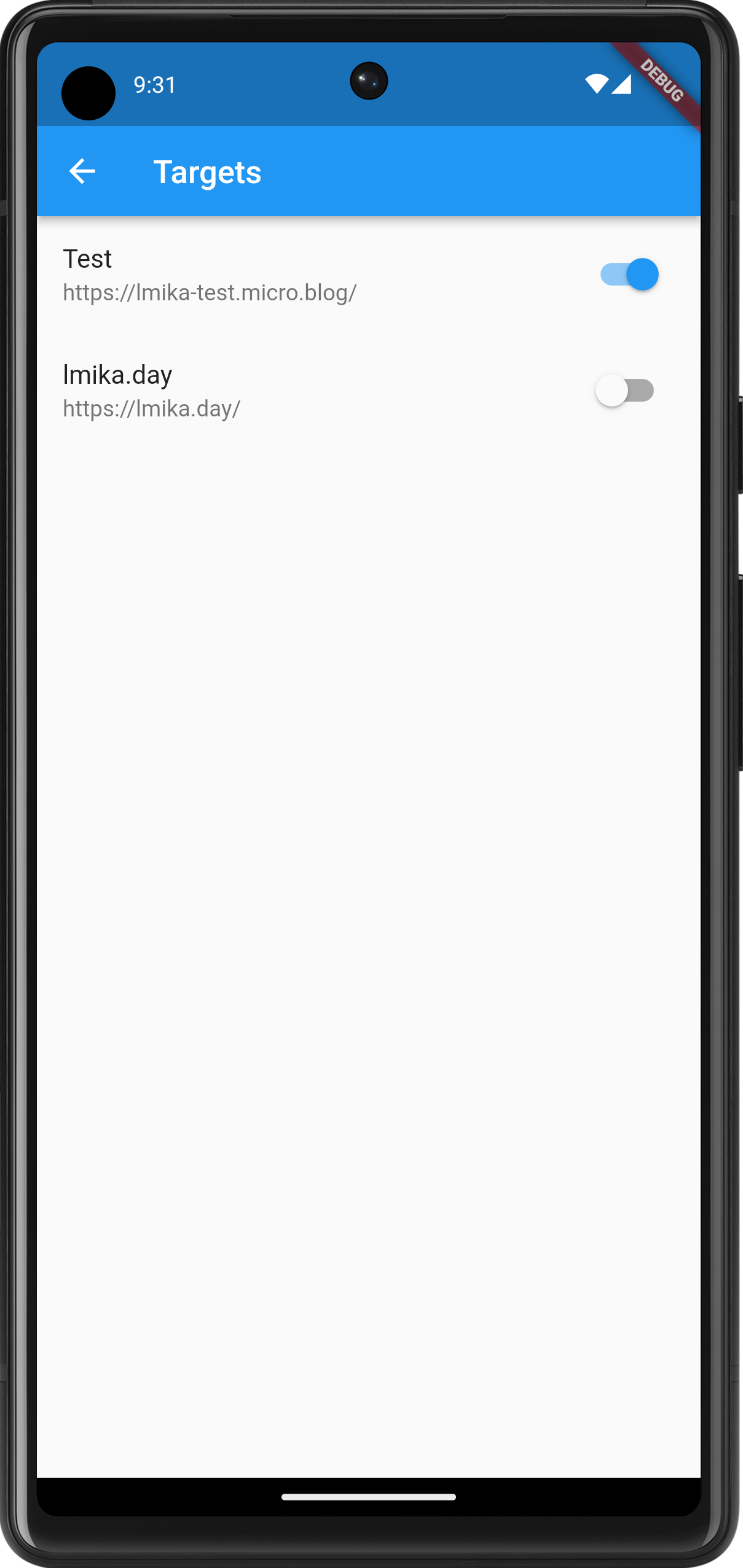
The targets are currently hard-coded but they can be turned on or off. I had a bit of trouble publishing a check-in to two targets, so I'm not sure if I'll keep multi-target publishing. On the subject of publishing, I had some issues with Dart’s date and time methods. The method on the DateTime class used to produce an ISO-8501 date-stamp don’t include the time-zone if the date and time is not in UTC. This is important as I want the post date and time to be as close to the check-in time as possible, and in the time-zone of the phone. DateTime knows all this, including what the time-zone we’re in. So why didn’t the developers include it in the ISO-8501 date-time string?
This is really strange. Fortunately, ChatGPT stepped in to help out, writing a function which will add the time-zone offset to the ISO-8501 date-time string:
String formatTimeZoneOffset(Duration offset) {
  String sign = offset.isNegative ? '-' : '+';
  int hours = offset.inHours.abs();
  int minutes = (offset.inMinutes.abs() % 60);

  return '$sign${_padZero(hours)}:${_padZero(minutes)}';
}
Honestly, ChatGPT has been so helpful over the past week with this project, I probably should give it a credit if I get this polished enough to release.
devlog screenshots -
Back working on Micropub Checkin. Re-engineered the home page to now include a list of what would eventually be check-ins — both historical and soon to be published — complete with the check-in type emoji as the icon:
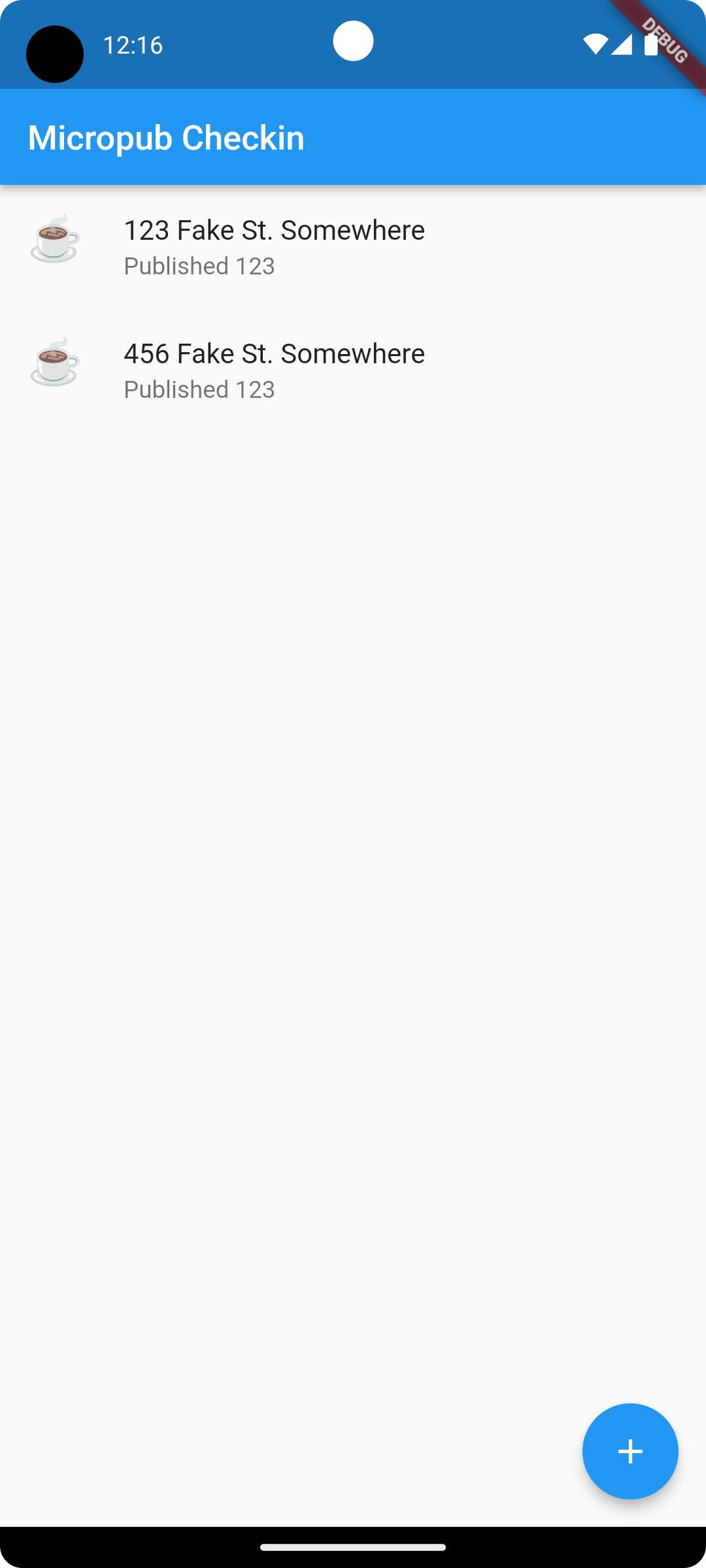
Main screen for Micropub Checkin The same list of emoji icons now adorn the check-in type picker as well (except for the airplane one which seems to always be shown as what I can only describe as the “Wingding” representation):
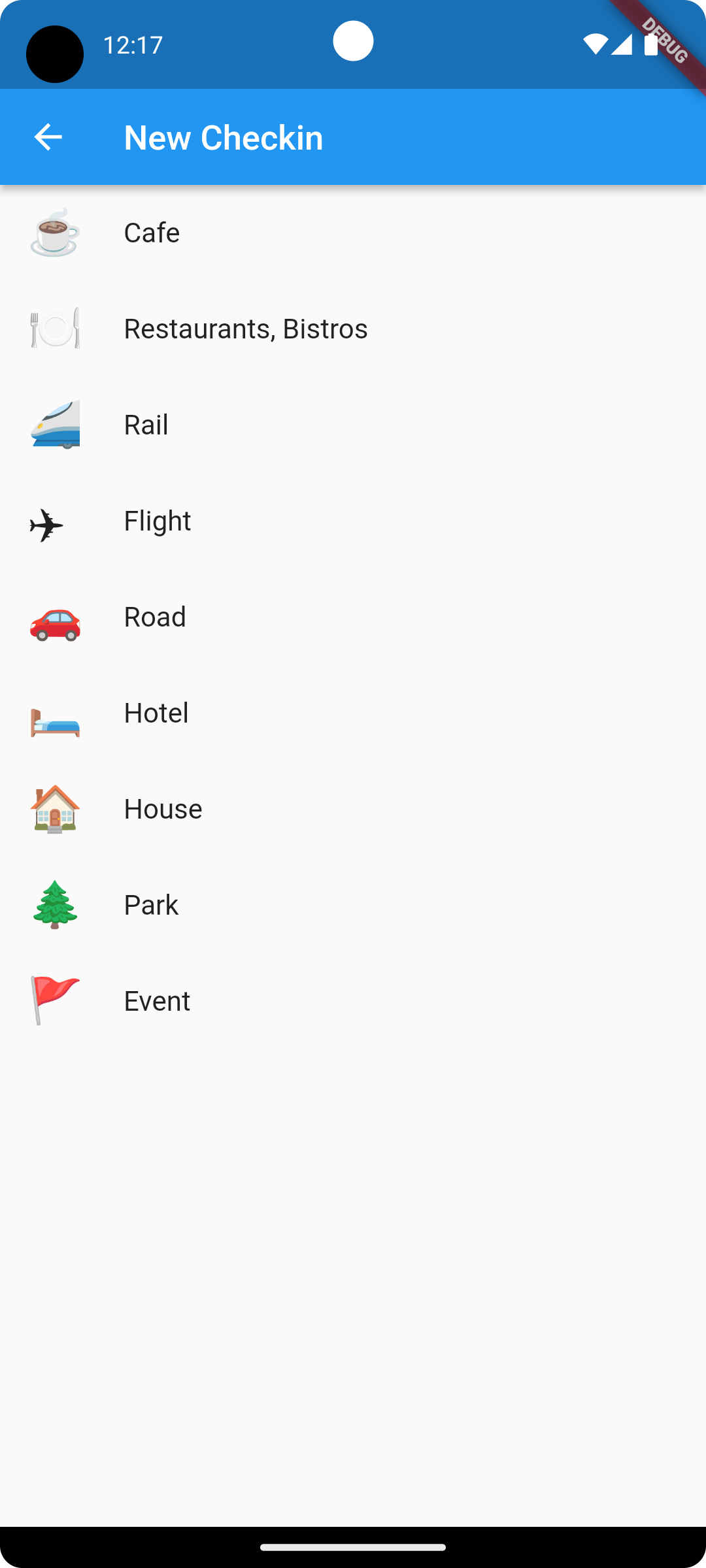
The check-in type picker I went around a bit trying to work out how best to use these emojis icons in the
leadingslot of theListTilewidget. I expored trying to convert them toIconData, but it turns out just using aTextwidget with a large font worked well. I wrapped in in aWidgettype with a fixed font-size and so far it looks quite good, at least in the emulator:class EmojiIcon extends StatelessWidget { final String emoji; const EmojiIcon({super.key, required this.emoji}); Widget build(BuildContext context) { return Text(emoji, style: TextStyle(fontSize: 26.0)); } }Also started working on a Cubit to handle state for the main page. I had a bit of trouble working ont where the soon-to-be database call to get the list of checkins should go in the cubit. After asking ChatGPT, it looks like the initializer is the best place for it:
class CheckinListCubit extends Cubit<CheckinListState> {

  CheckinListCubit(): super(LoadingCheckinListState()) {
    loadCheckinList();
  }

  void loadCheckinList() async {
    var listOfCheckins = await read_database();
    emit(FoundCheckinListState(checkins));
  }
}
I’ve got some scaffolding code in place to simulate this, and so far it seems to work.
I need to start working on the database layer and having the ability to edit and delete check-ins before they’re published. I think I’ll tackle that next.
devlog screenshots -
Building F5 To Run
At the risk of talking about something that I’ve only just started, I’d thought today I write about what I’m working on right now.
I’ve been going through my digital archives this weekend, trying to get it into something more permenant than the portable USB drives it’s currently stored on. Amongst all that stuff is a bunch of QBasic apps and games I wrote way back when I was a kid. Over the years it’s laid dormant but I do like revising them from time to time.
Continue reading → -
Updates To Dynamo-Browse
In the off-chance that anyone other than me is reading this, it’s likely that there will be no update next week due to the Easter weekend. It may not be the only weekend without an update either. If I find that I didn’t get much done for a particular week, I probably won’t say anything and leave the well to fill up for the next one (although I do have some topics planned for some of those weekends).
Continue reading → -
Updating Bocce Scorecard
I didn’t get to a lot of side-project work this week, but I did have to make a large change to a project we use to track scores for our “bocce club”. So I’d though I’d say a few words about that today.
We had our bocce “grand final” a few weeks ago, and one of the matches resulted in a tie between two players. Unfortunately, the Bocce Scorecard web-app I build could not properly handle these, which meant that I had to fix it.
Continue reading → -
Updates To Dynamo-Browse And CCLM
I started this week fearing that I’d have very little to write today. I actually organised some time off over the weekend where I wouldn’t be spending a lot of time on side projects. But the week started with a public holiday, which I guess acted like a bit of a time offset, so some things did get worked on.
That said, most of the work done was starting or continuing things in progress, which is not super interesting at this stage. I’ll hold off on talking about those until there’s a little more there. But there were a few things that are worth mentioning.
Continue reading → -
Dev Log - 2023-03-12
Preamble
When I moved Working Set over to Micro.blog, I’d thought I’d be constantly writing micro-posts about what I’m working on, as a form of working in public. I found that didn’t really work for me, for a few reasons.
I’ve got a strange relationship with this blog. I wanted a place online to write about the projects I’ve been working on, but every time I publish something here, I always get the feeling that I’m “showing off” in some way: ooh, look what I’ve done, aren’t I cleaver? And okay, I’d be lying if there’s not a part of me that wants others to see how I spend my time. If I didn’t want that, I’d be content with these posts existing in a private journal.
Continue reading → -
Completed the release of Dynamo-Browse 0.2.0. Most of the work in the last week was updating the manual, especially the scripting API. Some more updates need to be made for the query expressions as well, but I’ll publish what I have now and update that over time.
devlog -
Here’s a bit of a blast from the past. I managed to get ccedit working again. This was the original level editor for workingset.net/2022/12/2… my Chips Challenge “fan game” I’ve been working on.
I’ve been designing a few levels for it recently, but since moving to a new Mac, the level editor I was using was going to be difficult to port. It’s QT application and the QT bindings were a pain to setup, and I rather not go through that again. I was using a Mac at the time I started working on it, but I wasn’t yet ready to go all in on MacOS. So to hedge my bets, I decided to go with QT as the UI toolkit.
This was 5 years ago and I’m unlikely to go back to Linux, so choosing QT was a bit of a bad decision. I think if I had my time again, I’d go with something like AppKit.
Anyway, the level editor still works but I have to log into a screen share to use it. I’d like to be able to edit levels on the machine I’m using now.
The code for the original level editor was still around but it hasn’t been touched in ages. It’s basically an SDL application — the same graphics library I’m using for the actual game itself — and the SDL v2 bindings I’m using are still maintained, so updating those were quite easy1.
One thing I did have to pull out was the Lua VM2. The editor was using old C Lua bindings. Better Lua VMs written in pure Go are now available, so I didn’t want to keep using these old bindings anymore. In fact, I didn’t want to use Lua at all. Lua was originally used for the level scripts, but I replaced this in favour of another language (which is no longer maintained 😒, but I’m not changing it again).
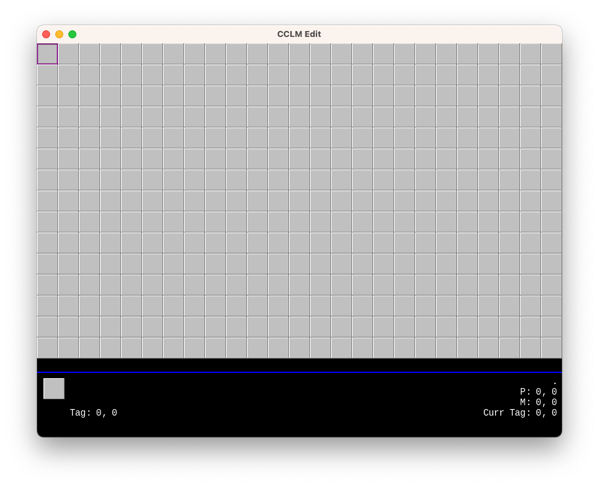
The original CCLM Editor So far the editor boots up, but that’s about it. I can move the cursor around but I can’t add new tiles or load existing levels. There seems to be some weird things going on with the image name lookup. I originally thought image name were case insensitive, but after looking at the image name lookup logic in the game itself, I’m not so sure.
How much time I’d like to spend on this is still a bit of a question. It all depends whether I’d like to release the game itself in some fashion. There are still questions about whether I’m allowed to, given that the graphics are not my own. Still need to think about that.
But in any case, good to see the old editor again.
devlog screenshots -
Spent some time closing off the Dynamo-Browse shortlist. I think I’ve got most of the big ticket items addressed. Here’s a brief update on each one:
Fix the activity indicator that is sometimes not clearing when a long running task is finished.
How long running tasks are dealt with has been completely overhauled. The previous implementation had many opportunities for race conditions, which was probably the cause of the activity indicator showing up when nothing was happening. I rewrote this using a dedicated goroutine for handling these tasks, and the event bus for sending events to the other areas of the app, including the UI layer. Updates and status changes are handled with mutexes and channels, and it just feels like better code as well.
It will need some further testing, especially in real world use against a real DynamoDB database. We’ll see if this bug rears its unpleasant head once more.
Fix a bug in which executing a query expression with just the sort key does nothing. I suspect this has something to do with the query planner somehow getting confused if the sort key is used but the partition key is not.
Turns out that this was actually a problem with the “has prefix” operator. It was incorrectly determining that an expression of the form
sort_key ^= "string"with no partition key could be executed as a query instead of a scan. Adding a check to see if the partition key also existed in the expression fixed the problem.Also made a number of other changes to the query expression. Added the ability to use indexed references, like
this[1]orthat["thing"]. This has been a long time coming so it’s good to see it implemented. Unfortuntly this only works reliably when a single level is used, sothis[1][2]will result in an error. The cause of this is a bug in the Go SDK I’m using to produce the query expressions that are run against the database. If this becomes a problem I look at this again.I also realised that
trueandfalsewere not treated as boolean literals, so I fixed that as well.Finally, the query planner now consider GSIs when it’s working out how to run a query expression. If the expression can be a query over a GSI, it will be executed as one. Given the types of queries I need to run, I’ll be finding this feature useful.
Fix a bug where
set default-limitsreturns a bad value.This was a pretty simple string conversion bug.
Add a way to describe the table, i.e. show keys, indices, etc. This should also be made available to scripts. Add a way to “goto” a particular row, that is select rows just by entering the value of the partition and optionally the sort key.
These I did not do. The reason is that they’ll make good candidates for scripts and it would be a good test to see if they can be written as one. I think the “goto” feature would be easy enough. I added the ability to get information about the current table in the script, and also for scripts to add new key bindings, so I don’t force any issues here.
The table description would be trickier. There’s currently no real way to display a large block of text (except the status bar, but even there it’s a little awkward). So a full featured description might be difficult. But the information is there, at least to a degree, so maybe something showing the basics would work.
Anyway, the plan now is to use this version for a while to test it out. Then cut a release and update the documentation. That’s a large enough task in and of itself, but I’d really like to get this finished so I can move onto something else.
devlog -
Looking at the “backlog” of things to work on for Dynamo-Browse before I set it aside. I’ll fix a few bugs and add a few small features that I’ve found myself really wanting. The short list is as follows:
- Fix the activity indicator that is sometimes not clearing when a long running task is finished.
- Fix a bug in which executing a query expression with just the sort key does nothing. I suspect this has something to do with the query planner somehow getting confused if the sort key is used but the partition key is not.
- Fix a bug where
set default-limitsreturns a bad value. - Add a way to describe the table, i.e. show keys, indices, etc. This should also be made available to scripts.
- Add a way to “goto” a particular row, that is select rows just by entering the value of the partition and optionally the sort key.
I’ll start with these and see how I go.
Oh, and one more thing: I will need to kill my darlings, namely the other commands in the “audax” repository that I’ve hacked togeather. They’re mildly useful — one of them is used to browse SSM parameters and another is used to view JSON log files — but they’re unloved and barely functional. I’ll move them out of the “audax” repository and rename this repo to “dynamo-browse”, just to make it less confusing for everyone.
devlog -
I think I’ll take a little break from Dynamo-Browse. There’s a list of small features that are on my TODO list. I might do one or two of them over the next week, then cut and document a release, and leave it for a while.
I’m still using Dynamo-Browse pretty much every day at work, but it feels a little demotivating being the only person that’s using it. Even those at work seem like they’ve moved on. And I can understand that: it’s not the most intuitive bit of software out there. And I get the sense that it’s time to do something new. Maybe an online service or something. 🤔
devlog -
Finally bit the bullet and got scripting working in Dynamo-Browse. It’s officially in the tool, at least in the latest development version. It’s finally good to see this feature implemented. I’ve been waffling on this for a while, as the last several posts can attest, and it’s good to see some decisions made.
In the end I went with Tamarin as the scripting language. It was fortunate that the maintainer released version 1.0 just as I was about to merge the scripting feature branch into
main. I’ve been trying out the scripting feature at work and so far I’ve been finding it to work pretty well. It helps that the language syntax is quite close to Go, but I also think that the room to hide long-running tasks from the user (i.e. no promises everywhere) dramatically simplifies how scripts are written.As for the runtime, I decided to have scripts run in a separate go-routine. This means they don’t block the main thread and the user can still interact with the tool. This does mean that the script will need to indicate when a long running process is occurring — which they can do by displaying a message in the status line — but I think this is a good enough tradeoff to avoid having a running script lock-up the app. I still need to add a way for the user to kill long-running scripts (writing a GitHub ticket to do this now).
At the moment, only one script can run at any one time, sort of like how JavaScript in the browser works. This is also intentional, as it will prevent a whole bunch of scripts launching go-routines and slowing down the user experience. I think it will help in not introducing any potential synchronisation issues with parallel running scripts accessing the same memory space. No need to build methods in the API to handle this. Will this mean that script performance will be a problem? Not sure at this stage.
I’m also keeping the API intentionally small at this stage. There are methods to query a DynamoDB table, get access to the result set and the items, and do some basic UI and OS things. I’m hoping it’s small enough to be useful, at least at the start, without overwhelming script authors or locking me into an API design. I hope to add methods to the API over time.
Anyway, good to see this committed to.
-
Poking Around The Attic Of Old Coding Projects
I guess I’m in a bit of a reflective mood these pass few days because I spent the morning digging up an old project that was lying dormant for several years. It’s effectively a clone of Chips Challenge, the old strategy game that came with the Microsoft Entertainment Pack. I was a fan of the game when I was a kid, even though I didn’t get through all the levels, and I’ve tried multiple times to make a clone of it.
Continue reading → -
Spent the day restyling the Dynamo-Browse website. The Terminal theme was fun, but over time I found the site to be difficult to navigate. And if you consider that Dynamo-Browse is not the most intuitive tool out there, an easy to navigate user manual was probably important. So I replaced that theme with Hugo-Book, which I think is a much cleaner layout. After making the change, and doing a few small style fixes, I found it to be a significant improvement.
I also tried my hand at designing a logo for Dynamo-Browse. The blue box that came with the Terminal theme was fine for a placeholder, but it felt like it was time for a proper logo now.
I wanted something which gave the indication of a tool that worked on DynamoDB tables while also leaning into it’s TUI characteristics. My first idea was a logo that looked like the DynamoDB icon in ASCII art. So after attempting to design something that looks like it in Affinity Designer, and passing it through an online tool which generated ASCII images from PNG, this was the result:
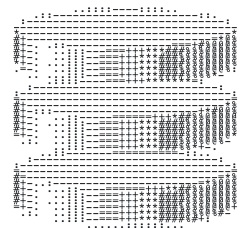
I tried adjusting the colours of final image, and doing a few things in Acorn to thicken the ASCII characters themselves, but there was no getting around the fact that the logo just didn’t look good. The ASCII characters were too thin and too much of the background was bleeding through.
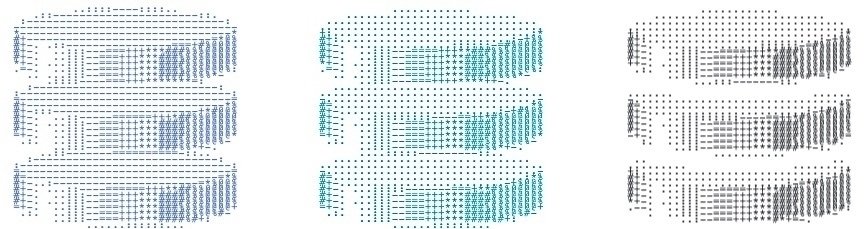
So after a break, I went back to the drawing board. I remembered that there were actually Unicode block characters which could produce filled-in rectangles of various heights, and I wondered if using them would be a nice play on the DynamoDB logo. Also, since the Dynamo-Browse screen consists of three panels, with only the top one having the accent colour, I thought having a similar colour banding would make a nice reference. So I came up with this design:

And I must say, I like it. It does look a little closer to low-res pixel art than ASCII art, but what it’s trying to allude to is clear. It looks good in both light mode and dark mode, and it also makes for a nice favicon.
That’s all the updates for the moment. I didn’t get around to updating the screenshots, which are in dark-mode to blend nicely with the dark Terminal theme. They actually look okay on a light background, so I can probably hold-off on this until the UI is changed in some way.
devlog screenshots -
I’ve been resisting using mocks in the unit tests of Dynamo-Browse, but today I finally bit the bullet and started adding them. There would have just been too much scaffolding code that I needed to write without them. I guess we’ll see if this was a wise decision down the line.
devlog -
Thinking About Scripting In Dynamo-Browse, Again
I’m thinking about scripting in Dynamo-Browse. Yes, again.
For a while I’ve been using a version of Dynamo-Browse which included a JavaScript interpreter. I’ve added it so that I could extend the tool with a few commands that have been useful for me at work. That branch has fallen out of date but the idea of a scripting feature has been useful to me and I want to include it in the mainline in some way.
Continue reading → -
Project Exploration: A Check-in App
I’m in a bit of a exploratory phase at the moment. I’ve set aside Dynamo-Browse for now and looking to start something new. Usually I need to start two or three things before I find something that grabs me: it’s very rare that I find myself something to work on that’s exciting before I actually start working on it. And even if I start something, there’s a good chance that I won’t actually finish it.
Continue reading → -
Dynamo-Browse Running With iSH
Bit of a fun one today. After thinking about how one could go about setting up a small dev environment on the iPad, I remembered that I actually had iSH installed. I’ve had for a while but I’ve never really used it since I never installed tools that would be particularly useful. Thinking about what tools I could install, I was curious as to whether Dynamo-Browse could run on it. I guess if Dynamo-Browse was a simple CLI tool that does something and produces some output, it wouldn’t be to difficult to achieve this. But I don’t think I’d be exaggerating if I said Dynamo-Browse is a bit more sophisticated than your run-of-the-mill CLI tool. Part of this is finding out not only whether building it was possible, but whether it will run well.
Continue reading → -
Nee Audax Toolset
I’ve decided to retire the Audax Toolset name, at least for the moment. It was too confusing to explain what it actually was, and with only a single tool implemented, this complexity was unnecessary.
The project is now named after the sole tool that is available: Dynamo-Browse. The site is now at dynamobrowse.app, although the old domain will still work. I haven’t renamed the repository just yet so there will still be references to “audax”, particularly the downloads section. I’m hoping to do this soon.
Continue reading → -
Most of what’s going on with Audax and Dynamo-Browse is “closing the gap” between the possible queries and scans that can be performed over a DynamoDB table, and how they’re represented in Dynamo-Browse query expression language. Most of the constructs of DynamoDB’s conditions expression language can now be represented. The last thing to add is the
size()function, and that is proving to be a huge pain.The reason is that the IR representation is using the expression builder package to actually put the expression together. These builders uses Go’s type system to enforce which constructs work with each other one. But this clashes with how I built the IR representation types, which are essentially structs implement a common interface. Without having an overarching type to represent an expression builder, I’m left with either using a very broad type like
any, or completely ditching this package and doing something else to build the expression.It feels pretty annoying reaching the brick wall just when I was finishing this off. But I guess them’s the breaks.
One other thing I’m still considering is spinning out Dynamo-Browse into a separate project. It currently sits under the “Audax” umbrella, with the intention of releasing other tools as part of the tool set. These tools actually exist1 but I haven’t been working on them and they’re not in a fit enough state to release them. So the whole Audax concept is confusing and difficult to explain with only one tool available at the moment.
I suppose if I wanted to work on the other tools, this will work out in the end. But I’m not sure that I do, at least not now. And even if I do, I’m now beginning to wonder if building them as TUI tools would be the best way to go.
So maybe the best course of action is to make Dynamo-Browse a project in it’s own right. I think it’s something I can resurrect later should I get to releasing a second tool.
Edit at 9:48: I managed to get support for the size function working. I did it by adding a new interface type with a function that returns a
expression.OperandBuilder. The existing IR types representing names and values were modified to inherit this interface, which gave me a common type I could use for the equality and comparison expression builder functions.This meant that the IR nodes that required a name and literal value operand — which are the only constructs allowed for key expressions — had to be split out into separate types from the “generic” ones that only worked on any
OperandBuildernode. But this was not as large a change as I was expecting, and actually made the code a little neater.
-
Dynamo-Browse was actually the second TUI tool I made as part of what was called “awstools”. The first was actually an SQS browser. ↩︎
devlog -
-
Audax Toolset Version 0.1.0
Audax Toolset version 0.1.0 is finally released and is available on GitHub. This version contains updates to Dynamo-Browse, which is still the only tool in the toolset so far.
Here are some of the headline features.
Adjusting The Displayed Columns
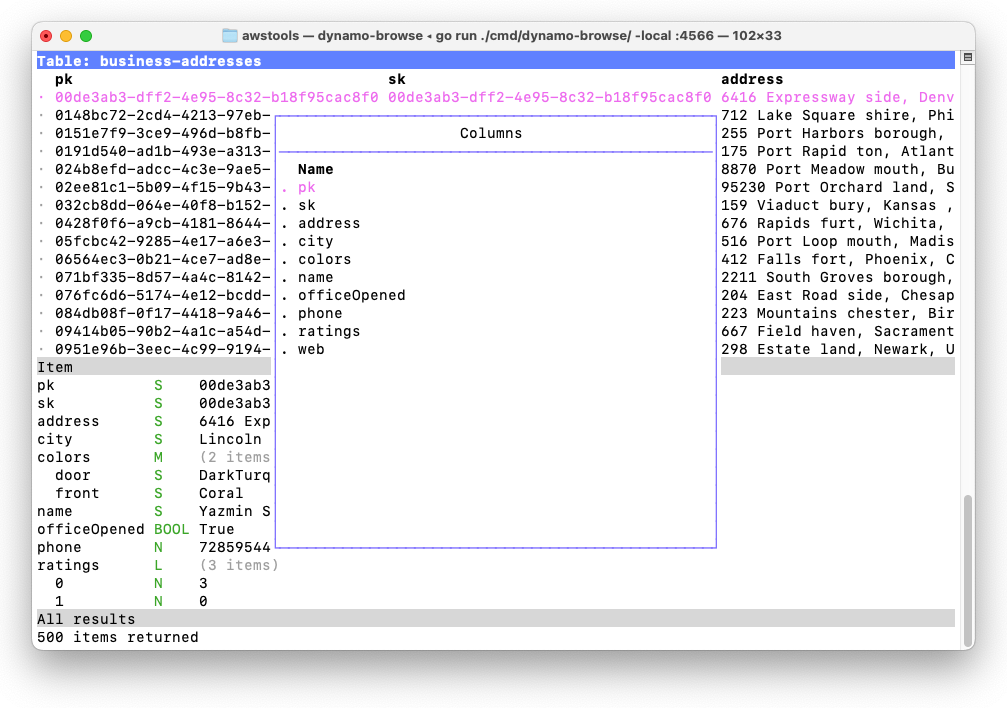
Consider a table full of items that look like the following:
pk           S    00cae3cc-a9c0-4679-9e3a-032f75c2b506
sk           S    00cae3cc-a9c0-4679-9e3a-032f75c2b506
address      S    3473 Ville stad, Jersey , Mississippi 41540
city         S    Columbus
colors       M    (2 items)
  door       S    MintCream
  front      S    Tan
name         S    Creola Konopelski
officeOpened BOOL False
phone        N    9974834360
ratings      L    (3 items)
  0          N    4
  1          N    3
  2          N    4
web          S    http://www.investorgranular.net/proactive/integrate/open-source
Let’s say you’re interested in seeing the city, the door colour and the website in the main table which, by default, would look something like this:
Continue reading → -
Putting the final touches on the website for the upcoming release of Audax Toolset v0.1.0, and I’m finding myself a bit unhappy with it. Given that Dynamo-Browse is the only tool in this “suite”, it feels weird putting together a landing page with a whole lot of prose about this supposed collection of tools. There’s no great place to talk more about Dynamo-Browse right there on the landing page.
Part of me is wondering whether it would be better focusing the site solely on Dynamo-Browse, and leave all this Audax Toolset stuff on the back-burner, at least until (or unless) another tool is made available through this collection. I’m wondering if I’ll need to rearrange the codebase to do this, and spin out the other commands currently in development into separate repositories.
devlog -
Bridging The Confidence Gap
I had to do some production work with DynamoDB this morning. It wasn’t particularly complicated work: run a query, get a couple of rows, change two attributes on each one. I could have used Dynamo-Browse to do this. But I didn’t. Despite building a tool designed for doing these sorts of things, and using it constantly for all sorts of non-prod stuff, I couldn’t bring myself to use it on a production database.
Continue reading →