-
📘 Devlog
Godot Game - More On Level 3-1
Continuing level 3-1, plus adding some more elements to stop long falls. Continue reading →
-
📘 Devlog
Godot Game - More On Level 3-1
Continuing the build out of the new zone for level 3-1, plus implement a new variant of the balloon with mine entity. Continue reading →
-
📘 Devlog
Godot Game - The Back Third of Level 3-1
Redoing the back third of level 3-1 to be a closer match to the front third. Continue reading →
-
📘 Devlog
Blogging Tools - Podcast Clip Favourites
Finishing off the favourite podcast clips feature. Continue reading →
-
📘 Devlog
Blogging Tools - Podcast Clip Favourites
Working on saving podcast clips from Blogging Tools into a Hugo site, done in the “lab notes” running commentary approach. Continue reading →
-
Bit more on lifts in Godot today. Re-engineered how the whole thing works: now everything is driven by the stationary lift doors. Each door has a reference to a lift and a target door. This makes the lift carriage itself rather passive: it will continue to reparent the player as before, but it no longer needs to track activations or have animating doors of it’s own. The doors just tell it where and when to go.
This has got proper targeting working so that a lift can now move between a pair of doors. It also allows for the player to call for the lift when it’s not positioned at the doors already. There are a few more dependencies amongst the various entities, but I think it makes for a more robust system.
devlog -
Small change to the thirst mechanic for my Godot project. Switched from discrete thirst levels to a single timer that will tick down if the player is thirsty. This allowed for a change to how I indicate this to the player, replacing text messages that’ll be displayed at each thirst level with a gauge that shows up on the HUD.
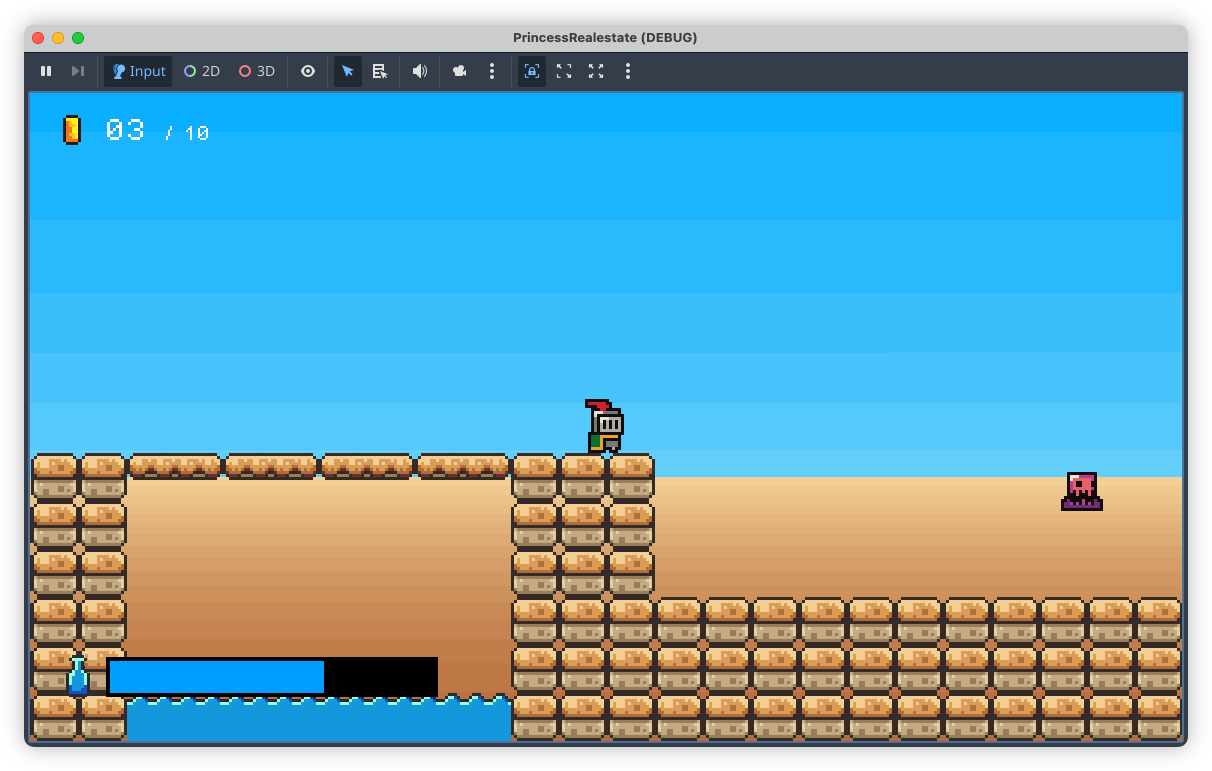
I thought that the messages would be enough, but after playing through with them, they turned out to be more of a hindrance. They didn’t communicate the player’s thirst level well enough: they show up for a few seconds, then disappear, leaving the player to wonder how much time they have. This information is now always present with the gauge. Plus, I think it gives more of a sense of urgency, in that a gauge that’s constantly ticking down will encourage the player to play a little faster in order to reach the next water bottle before they perish from thirst.
devlog screenshots -
More on that Godot project today. Finally bit the bullet and started working on proper backdrops. I’ve leaving the artwork until later (i.e. I’m procrastinating), today was all about the mechanics, trying to get parallax scrolling working. Fortunately Godot has built-in nodes to make this easy, although I did have to upgrade Godot to 4.5.
This is my first cut, some simple colour banding to represent sky and sand in one of the desert levels:
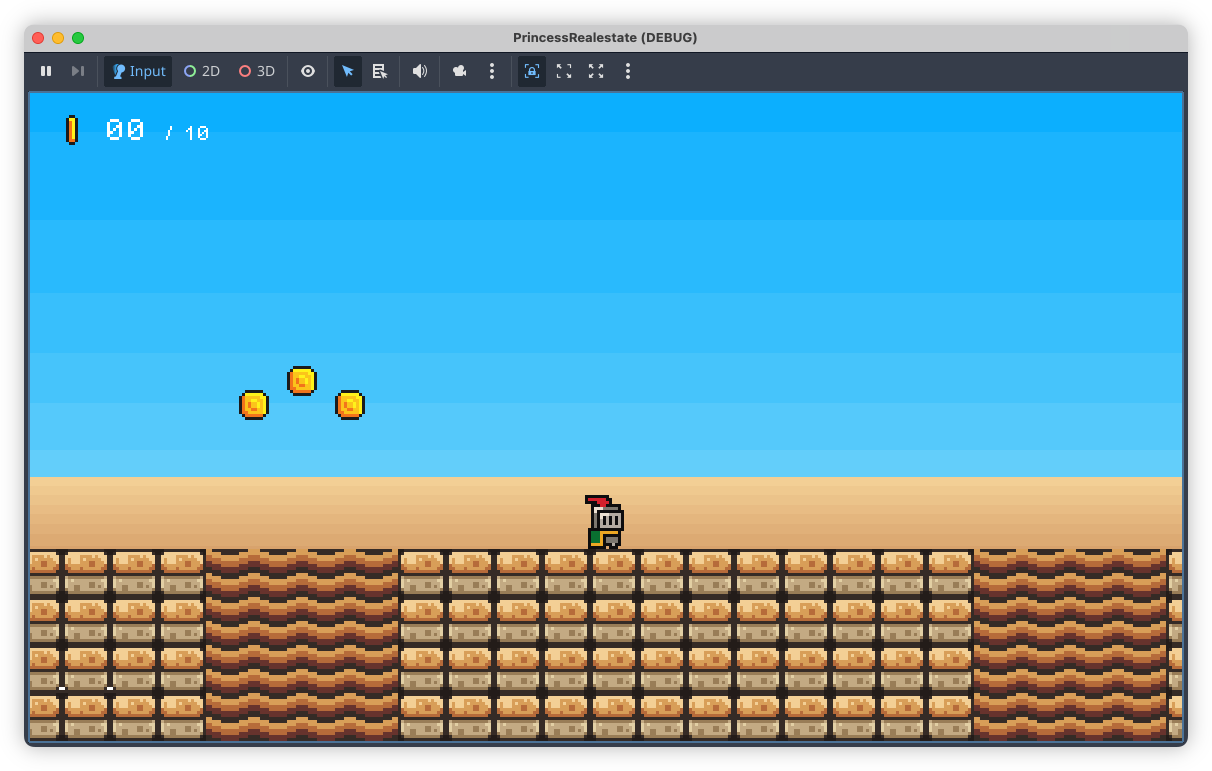
These two layers were added to the scene as Parallax2D nodes, each with a single Sprite child. Positioning the sprites was a little tricky. Godot suggests placing them at the origin, but what I didn’t understand was that the actual position of the sprite depends a lot on the scroll scale of the Parallax2D node. I added the sky layer without changing the scroll position and it took me a while before I discovered that it was appearing below the camera. Only after reducing the scroll scale to about 0.1 did it start showing up in the viewport (one nice thing about Godot 4.5 is that the “play scene” window includes debug options, allowing you to hijack the camera and move it around the scene).
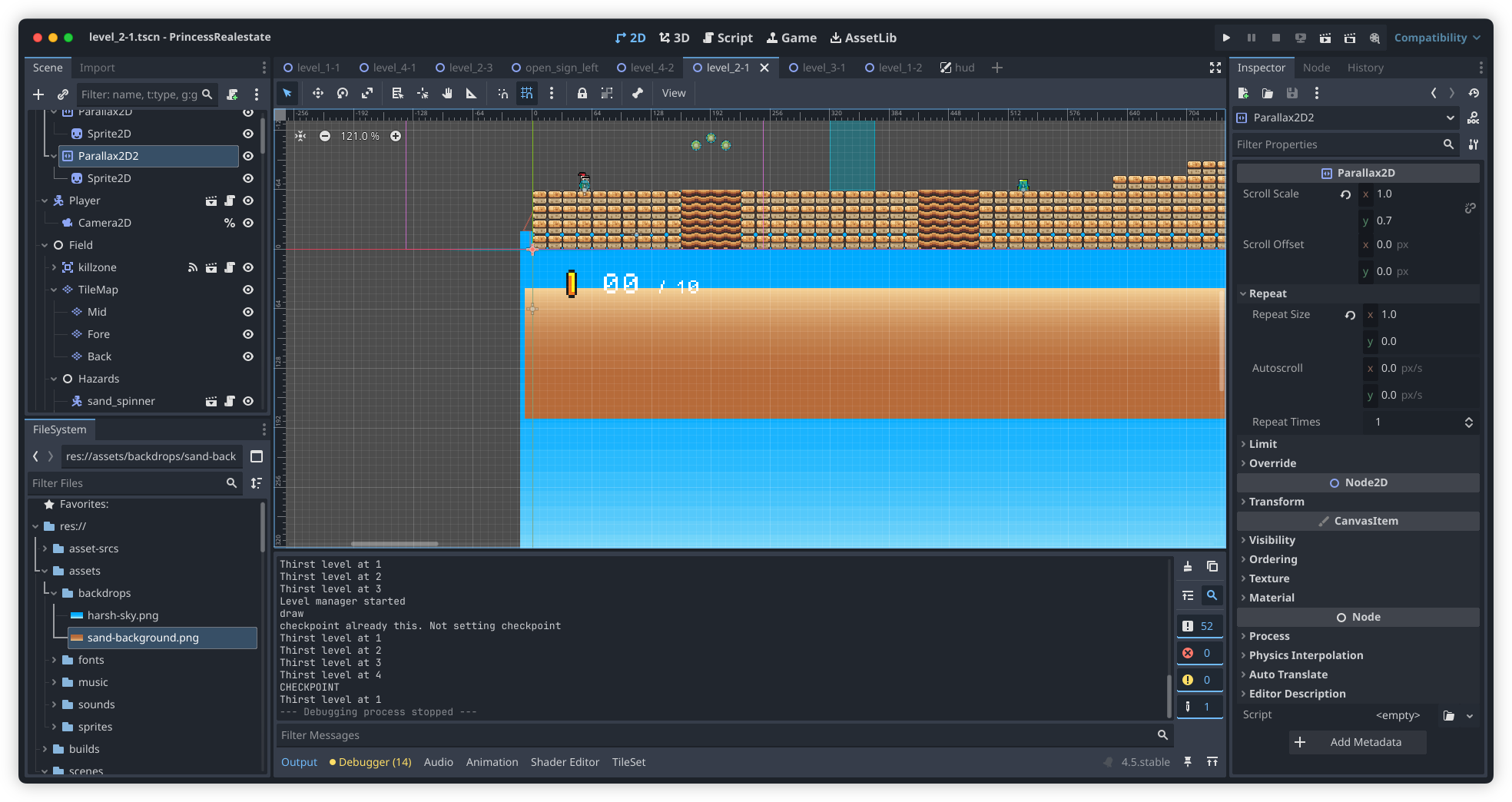
I will need to introduce some detail in the backdrop layers soon. The bands are too simple and may induce some vertigo when the player is ascending to high platforms. Plus, it just looks boring. Not that they’re meant to be eye-catching but something a little more interesting would be nice.
devlog screenshots -
Small DevLog update today. Continuing to work on that Godot game. I got the bulk of the mechanics of level 2-1 built (it still needs dressing up), and I spent this evening mainly just play-testing it, and tweaking it. I think I may need to get someone else to play-test it though, just to make sure it’s not too hard. It’s significantly long, coming in at 10,560 units horizontally, and given how many new mechanics are involved, I’m a little worried about the difficulty curve. But I am happy about the mix of elements I do have. It doesn’t feel boring, which was the concern I had. There are some timing challenges, and I the pacing across the level feels fine. But I really should convince someone else to try it out.
devlog -
📘 Devlog
Trying OpenAI Codex to Produce Freelens Logo Creator
Using OpenAI Codex to make a logo generator tool to allow customisation for different clusters in Freelens. Continue reading →
-
Ah, MacOS’s locked-down nature strikes again! Was testing the CI/CD build for Dequoter and after downloading the artefact and attempting to open it, I got this warning message:
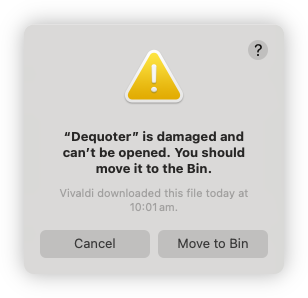
Turn’s out it was being quarantined by MacOS, and these instructions resolved the issue:
xattr -dr com.apple.quarantine '/Applications/Your Application.app'The binaries not notarised so I wasn’t expecting it to work out of the box. I was hoping that it would do that thing where the app will be listed in settings and I can allow it to launch from there, but I guess there’s something about where this file came from that was too much from MacOS. Ah well, I can live with this for the short term.
devlog screenshots -
📘 Devlog
Dequoter — Something Different Today
A new project called Dequoter was started to unquote a JSON string and filter it, utilizing Go for backend functionality and HTML for the frontend. Continue reading →
-
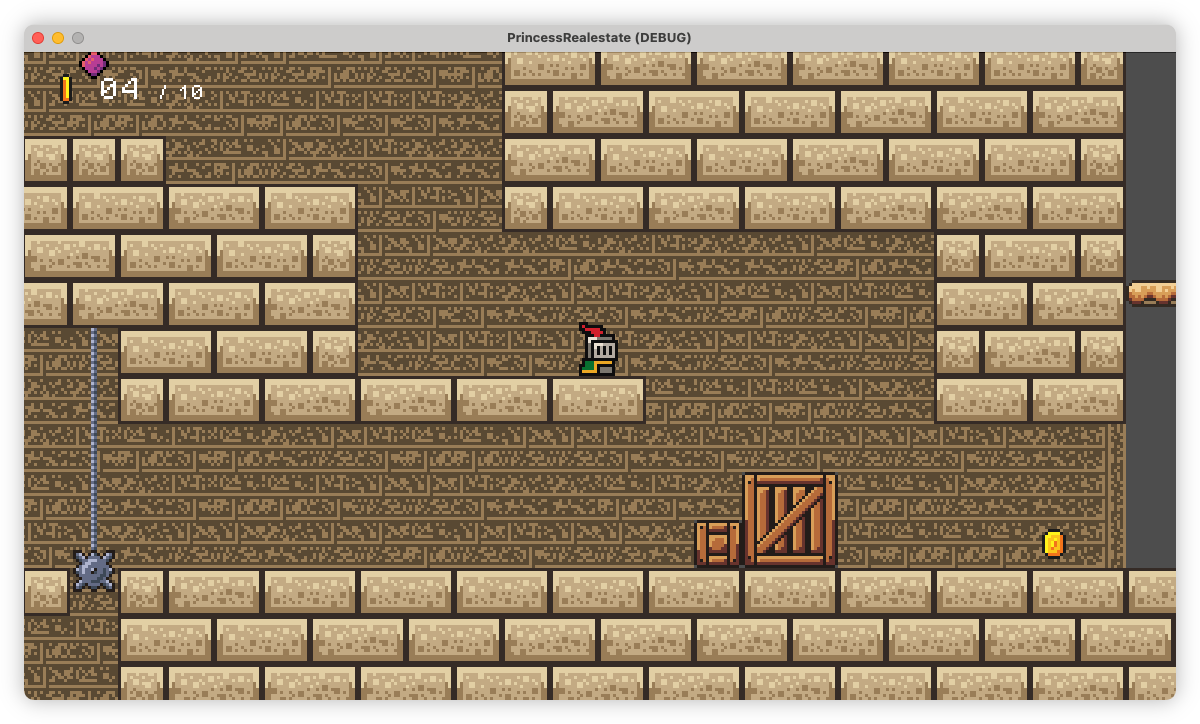
Starting to work on the background tiles. This is what I have so far. I hope it’s not too busy or distracting.
 devlog screenshots
 -
📘 Devlog
Godot Project — Bricks in Level 2-3 Laid
Just a quick update today. I’ve finished all the brickwork in level 2-3. And it didn’t go too badly. Made one significant mistake which would’ve involved a lot of rework, that I patched up with some single tiles:
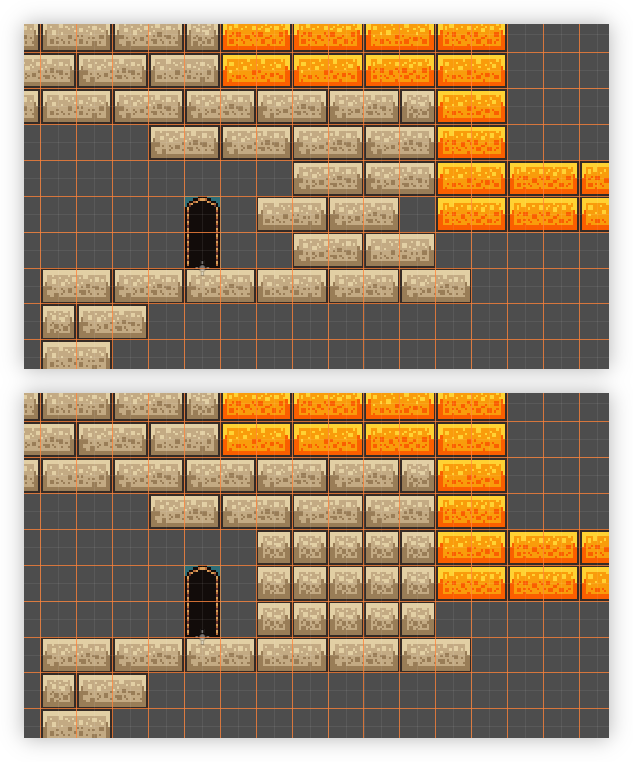
Top: the mistake. Bottom: the fix. Doing the rest of it was pretty dreary work. Godot does have some tools to make this easier, but there was no getting around the level of care needed to place the bricks correctly. But it’s all pretty much done now. And just for comparison to the before screenshots I took when I started, here’s how how the level looks now:
Continue reading → -
📘 Devlog
Shutting Down Nano Journal
With the move to Obsidian for my journalling needs, I shut down my bespoke journalling web-app. I deployed it on 26th August 2024, which makes it just over a year old. I did start using Obsidian on the 20th though, so it didn’t quite make it the entire year. Even so, not bad for something hand made and somewhat neglected. Most things I eventually abandon last way less than that.
Continue reading → -
📘 Devlog
Godot Project — Level 2-3 Update
-
📘 Devlog
UCL — Comparing UCL To Some Early Ideas
Comparing UCL to an idea for a hypothetical command language for a now-defunct CLI project, which aimed to combine shell-like REPL functionality with scripting capabilities. Continue reading →
-
📘 Devlog
Blogging Tools — All About Images
Some recent changes to Blogging Tools around images and image processing. Continue reading →
-
📘 Devlog
Godot Project — Level 4-2 And Level 2-3
Progress has been made on level 4-2, and early development on level 2-3, alongside new game elements. Continue reading →
-
📘 Devlog
Blogging Tools — Category Fixer
Adding an RSS feed parser and in-app notifications to build a feature to triage image posts that don’t have a category. Continue reading →
-
📘 Devlog
Godot Project — Some Feelings
Progress on the Godot game has been fulfilling yet tinged with doubt about its value and purpose. Continue reading →
-
📘 Devlog
UCL — More About The Set Operator
I made a decision around the set operator in UCL this morning.
When I added the set operator, I made it such that when setting variables, you had to include the leading dollar sign:
$a = 123The reason for this was that the set operator was also to be used for setting pseudo-variables, which had a different prefix character.
@ans = "this"I needed the user to include the
Continue reading →@prefix to distinguish the two, and since one variable type required a prefix, it made sense to require it for the other. -
That Which Didn't Make the Cut: a Hugo CMS
You’ve probably noticed1 that I’ve stopped posting links to Open Bookmarks, and have started posting them here again. The main reason for this is that I’ve abandoned work on the CMS I was working on that powered that bookmarking site. Yes, yes, I know: another one. Open Bookmarks was basically a static Hugo site, hosted on Netlify. But being someone that wanted to make it easy for me to post new links without having to do a Git checkout, or fiddle around YAML front-matter, I thought of building a simple web-service for this.
Continue reading → -
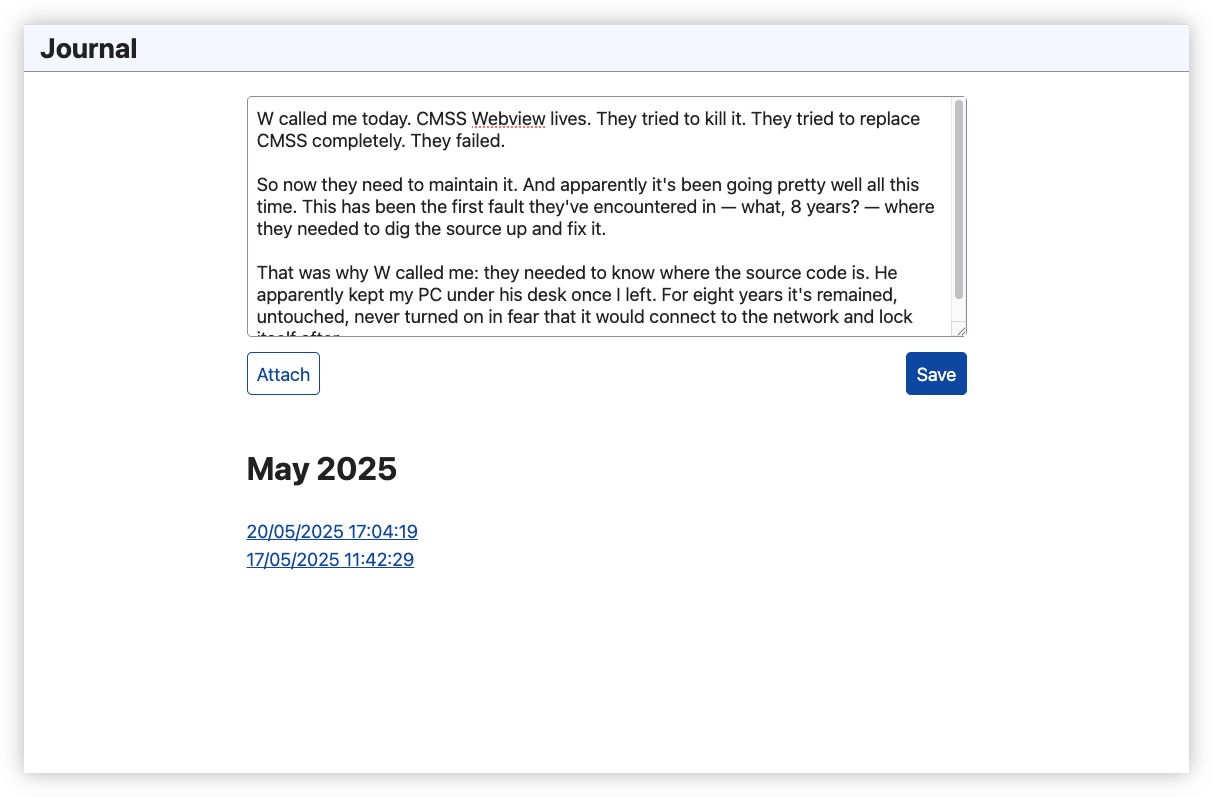
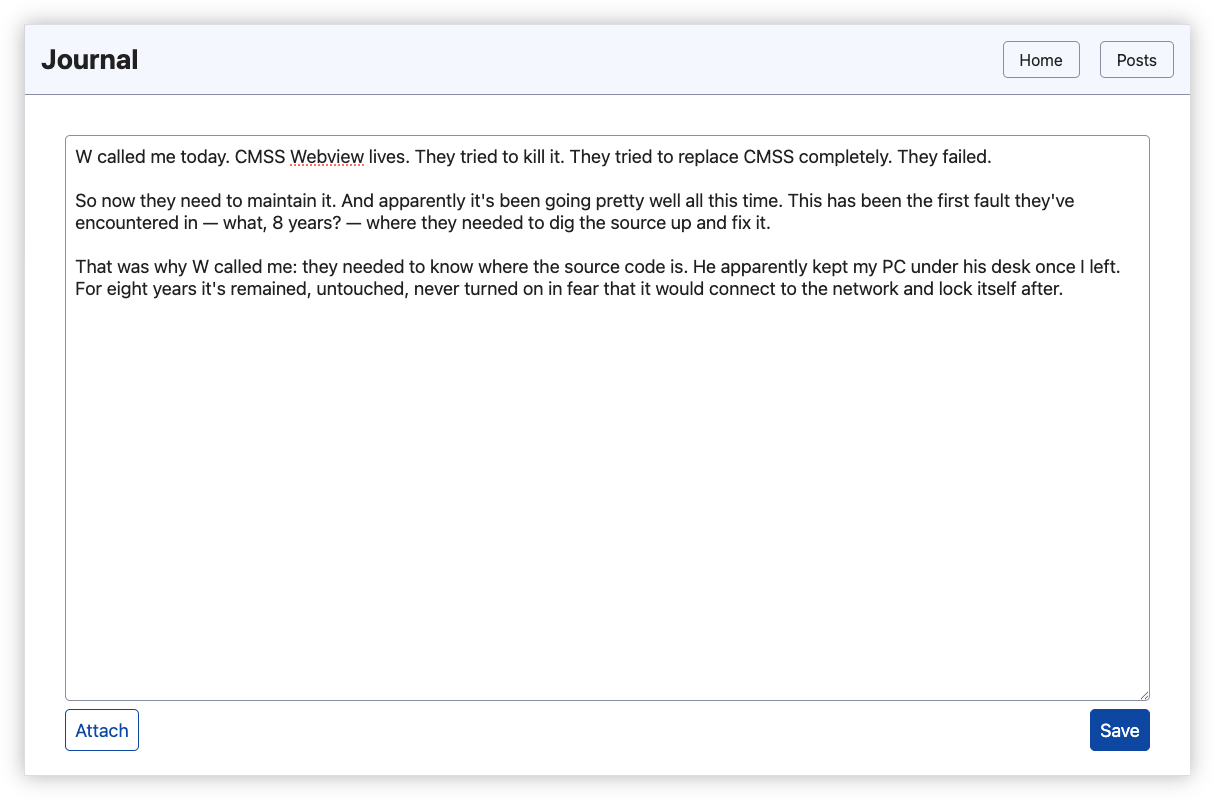
Had a reason to write a journal entry today, which meant I had a reason to work on the journaling app. Biggest change was moving the entry list to a separate page and supersizing the text-area to allow for larger entries. Good thing too: today’s was going to need all the space it could get.
 devlog
 -
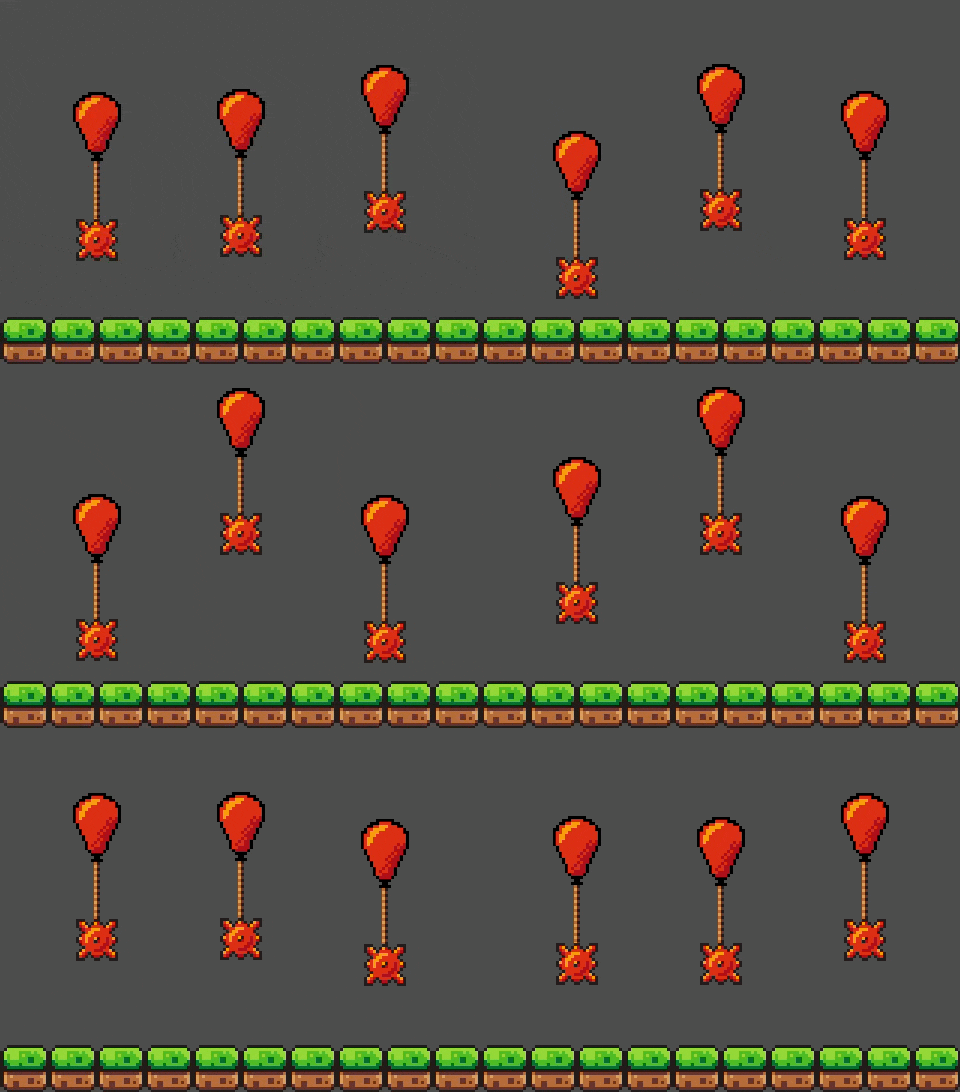
Working on that Godot game again, mainly coming up with mechanics for a new level 2. This is what I’ve got so far: a mine tethered to a balloon. Their idle state is just bobbing up and down, but I am planning a variant which will drop their payload and fly away when the player is nearby.
 devlog
 -
📘 Devlog
Dynamo-Browse Now Scanning For UCL Extensions
Significant milestone in integrating UCL with Dynamo-Browse, as UCL extensions are now being loaded on launch. Continue reading →
-
All the recent changes to UCL is in service of unifying the scripting within Dynamo Browse. Right now there are two scripting languages: one for the commands entered after pressing
:, and one for extensions. I want to replace both of them with UCL, which will power both interactive commands, and extensions.Most of the commands used within the in-app REPL loop has been implemented in UCL. I’m now in the process of building out the UCL extension support, start with functions for working with result sets, and pseudo-variables for modifying elements of the UI.
Here’s a demo of what I’ve got so far. This shows the user’s ability to control the current result-set, and the selected item programatically. Even after these early changes, I’m already seeing much better support for doing such things than what was there before.
-
📘 Devlog
UCL — Assignment
Some thoughts of changing how assignments work in UCL to support subscripts and pseudo-variables. Continue reading →
-
📘 Devlog
Blogging Tools — Finished Podcast Clips
Well, it’s done. I’ve finally finished adding the podcast clip to Blogging Tools. And I won’t lie to you, it took longer than expected, even after enabling some of the AI features my IDE came with. Along with the complexity that came from implementing this feature, that touched on most of the key subsystems of Blogging Tools, the biggest complexity came from designing how the clip creation flow should work. Blogging Tools is at a disadvantage over clipping features in podcast players in that it:
Continue reading → -
📘 Devlog
Blogging Tools — Ideas For Stills For A Podcast Clips Feature
I recently discovered that Pocketcasts for Android have changed their clip feature. It still exists, but instead of producing a video which you could share on the socials, it produces a link to play the clip from the Pocketcasts web player. Understandable to some degree: it always took a little bit of time to make these videos. But hardly a suitable solution for sharing clips of private podcasts: one could just listen to the entire episode from the site. Not to mention relying on a dependent service for as long as those links (or the original podcast) is around.
Continue reading → -
📘 Devlog
Dialogues
A post describing a playful dialogue styling feature, inspired by rubber-duck debugging, and discusses the process and potential uses for it. Continue reading →
-
📘 Devlog
Godot Game Update
A brief status update on that Godot game. I think we’re pretty close to a finished 4-1 level. The underground section has been built, and the level has been decorated. I’ve also added a couple of secrets, which needed a few new mechanics — like doorways, which are used to transport the player around the level — plus some refinement to existing ones. I am a little concerned about the amount of waiting involved near the end of the first half, where the player will need to make their way across a large gap by jumping on the slow cycling “layer 2” tile layer. I’ll see what feedback I get from play-testers about this.
Continue reading → -
Made some more progress on that Godot game. I haven’t gotten any further with the first level of world 2, so I’ve been spending much of my time making mechanics. One of them was the slow moving “level 2” mechanic that I stole wholesale from Super Mario World. That mechanic, despite it being frustrating to speed-runners, was always slightly interesting to me. To have areas of a level become accessible or hazardous just due to a layer of it oscillate up and down, it promised to make for some interesting timing challenges. At least in theory.
Portion of the new level showing all three new mechanics. I decided to put that theory to the test, and start work on one the later levels. And despite being a little skeptical about whether the mechanic could carry through a level on it’s own, I came up with one that I’m reasonably happy with. The mechanic is introduce slowly, and in a rather non-threatening way, proving the player the means to get to higher ground. This leads into the second half, which will be a long underground section which will ramp up the difficulty by introducing the risk of getting crushed or missing platforms.
To compliment this is a new enemy that rushes the player. The player cannot do anything to defeat this enemy: combat is not really a thing in this game. All they could do is evade it before the enemy gives up. I am reusing the same “green slime” sprite for this but I’m hoping that the differing animations provide some hints of how this enemy’s behaviour differs from that of the simpler one.
Finally, it was time to consider checkpoints. While the first few levels were too short to justify adding them in, this one is just that bit too long without one. And given the difficulty ramp-up in the second half, having the player go through the slower first half every time they died would probably lead to frustration. So checkpoints are now a thing. They’re not free — costing 5 coins to activate — and they are sometimes mandatory, blocking the player from progressing until they pay the toll. But I think their presence helps with eliminating the areas of the level that would just be boring to play through again and again.
So yeah, I’m quite happy with this level. And I’m also happy in realising that I’m not bound to building this game in the same progression that the player will experience it. It’s better sometimes to just work on the areas that you’re ready to. I mean, it’s sounds obvious to say that now. Not sure why it took me this long to actually do so.
-
Spent some time over the last few days working on that Godot game, mainly building new mechanics. This evening I started working on an interceptor, something that would jump out of the quicksand in order to disrupt the player’s jump. Here’s an example of how they look in the test bed:
And yeah, they’re pretty much a carbon-copy of the Podoboos from Mario. But I think there’s a reason they’re still making an appearance in games, years after their debut in Super Mario Brothers. They’re quite a versatile enemy, making jumping challenges a bit more interesting than just seeing whether the player the clear a gap. Plus they’re reasonably easy to make.
Another mechanic taken from Mario was a switch that revealed coins and tiles for a limited time. Hit it once and the child nodes of this “timed_limited_visible” scene are displayed and activated for 10 seconds, before they disappear again:
Much like the blue P switch this mechanic takes inspiration from, the switch can only be activated once. So it may be only useful for bonuses and areas the player can afford to miss.
I had to do some special handling for nested
TileMapnodes, since the player could still collide with them even when they’re hidden. How I solved this was nothing too spectacular: basically I just walk the child tree looking forTileMapinstances, and when encountering one, just enabling or disabling the first layer:func _show_and_activate_children(): visible = true process_mode = Node.PROCESS_MODE_INHERIT for tm in find_children("*", "TileMap", false): tm.set_layer_enabled(0, true) func _hide_and_deactivate_children(): visible = false process_mode = Node.PROCESS_MODE_DISABLED for tm in find_children("*", "TileMap", false): tm.set_layer_enabled(0, false)Building these elements was fun, but the main problem is that I’m struggling to come up with a centrepiece mechanic for level 2-1, something that defines the level in some way. I have an idea for level 2-2 — this world is set in a desert so I’m hoping to introduce a thirst mechanic — but level 2-1 I’m hoping to keep relatively plain so as to avoid overwhelming the player with too many new things. The fear is to avoid making it little more than what the player encountered in world 1: a series of jumping puzzles over pits. Sure, that’s pretty much the entire game in a way, but some variety would be nice.
I’m hoping one of these mechanics could help here. I guess I’ll find one once I’ve start seriously building the level.
-
The results of my first play-test are in. And overall, they were pretty positive: movement was good, hit-boxes were fair, and it was described as “quite fun,” which was better than I was hoping for.
One thing I’ll need to look out for is telegraphing secrets. The number of secrets is indicated at the end of the level, and based on the play-tester’s feedback, they seemed to have spent a lot of time running against walls trying to find them. There is one secret in the level 1-1 that I thought was telegraphed well, and I can confirm that the player found them all. But I will concede the others required the player to make a leap of faith, and fall into an area that the player will usually want to avoid, which is pretty unfair. So I’ll need to fix that.
devlog -
A bit more on the Godot game this morning, this time working on background tiles artwork. Made some grey masonry tiles for the end castle sequences. Also tried some background rocks for underground areas. I’m pretty rubbish at anything organic, but they didn’t turn out too bad.
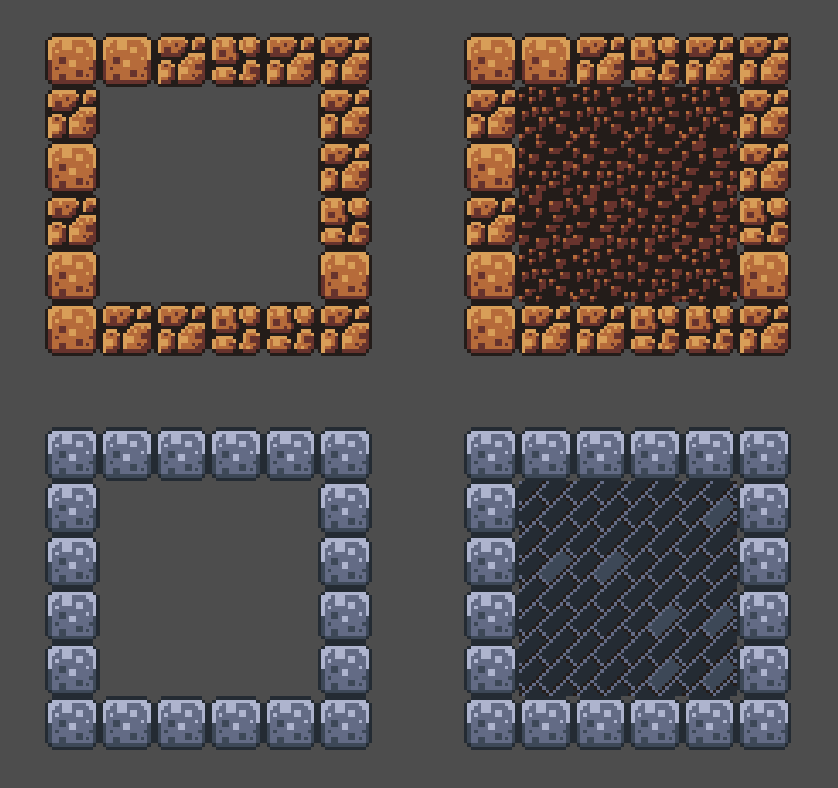
Right side has the background tiles surrounded with their complementary foreground tiles on the left. devlog screenshots -
A bit more on Godot this evening, mainly working on pausing the game, and the end-of-level sequence. Have got something pretty close to what I was looking for: a very Mario-esc sequence where the player enters a castle, it start auto-walking the character, and the level stats show up and “spin” for a bit. Not too bad, although I may need to adjust the timing and camera a little to keep the stats from being unreadable.
-
A bit more Godot work this evening. I wanted to add a foreground layer of tiles that obscured in the player. This is for making false walls to hide secrets around the level. It took me a while to work out how to turn off collision of this foreground layer: there wasn’t really any way to do so within the designer.
Fortunately, this Github comment showing how to do so using a script worked like a charm:
extends TileMap

const foreground_layer = 1

func _use_tile_data_runtime_update(layer: int, coords: Vector2i) -> bool:
	return layer == foreground_layer

func _tile_data_runtime_update(layer: int, coords: Vector2i, tile_data: TileData) -> void:
	tile_data.set_collision_polygons_count(0, 0)
Only limitation seems to be that it will disable collision for the whole layer, but that’s perfectly fine with me.
devlog -
Spent more time on my Godot platformer yesterday, mainly rebuilding the first level from scratch. The previous version was rush and was just not fun (it didn’t look good either, but I didn’t dress it up yet). This new one is much nicer, and allowed me to use a few new mechanics I’ve built.
I still need to build out the level ending sequence. I’ve got less than the basics at the moment: a drawbridge descends and that’s pretty much it. I need to add the conditions for when the bridge descends (specifically, a minimum number of coins), stopping the player movement for a brief scripted sequence, then transition to the next level. I think I know how I want to do this, it’s just a matter of implementing it. Once level 1 is dressed up and working, I think that’ll be the next thing I do.
I’m enjoying working on this project so far, although part of me is a little afraid that I’m spending time on something that just isn’t good, like there’s some sunk cost with the time I’m spending on this that’s better put to use on something else. Of course, when I give in to these feelings, I usually just spend the time watching TV. So which activity is the real waste of time? Is producing something that may be crap (or worse, just boring) better than not producing anything at all?
Anyway, not should how this became a feeling post. This game might be rubbish, but I still enjoy working on it: Godot is actually quite fun to use. Surely that is reason enough to continue.
devlog