
-
Here’s a bit of a blast from the past. I managed to get ccedit working again. This was the original level editor for workingset.net/2022/12/2… my Chips Challenge “fan game” I’ve been working on.
I’ve been designing a few levels for it recently, but since moving to a new Mac, the level editor I was using was going to be difficult to port. It’s QT application and the QT bindings were a pain to setup, and I rather not go through that again. I was using a Mac at the time I started working on it, but I wasn’t yet ready to go all in on MacOS. So to hedge my bets, I decided to go with QT as the UI toolkit.
This was 5 years ago and I’m unlikely to go back to Linux, so choosing QT was a bit of a bad decision. I think if I had my time again, I’d go with something like AppKit.
Anyway, the level editor still works but I have to log into a screen share to use it. I’d like to be able to edit levels on the machine I’m using now.
The code for the original level editor was still around but it hasn’t been touched in ages. It’s basically an SDL application — the same graphics library I’m using for the actual game itself — and the SDL v2 bindings I’m using are still maintained, so updating those were quite easy1.
One thing I did have to pull out was the Lua VM2. The editor was using old C Lua bindings. Better Lua VMs written in pure Go are now available, so I didn’t want to keep using these old bindings anymore. In fact, I didn’t want to use Lua at all. Lua was originally used for the level scripts, but I replaced this in favour of another language (which is no longer maintained 😒, but I’m not changing it again).
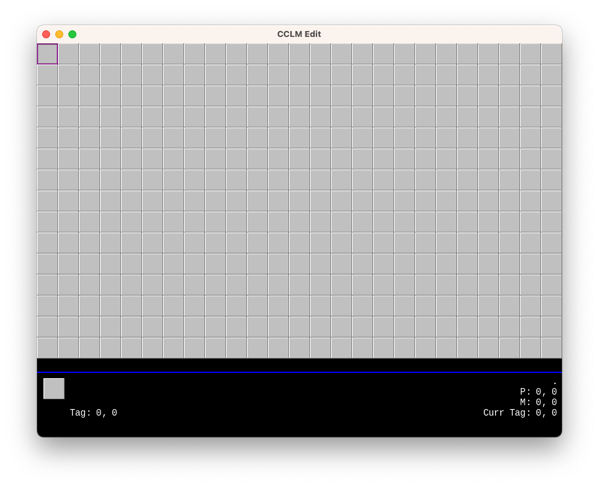
The original CCLM Editor So far the editor boots up, but that’s about it. I can move the cursor around but I can’t add new tiles or load existing levels. There seems to be some weird things going on with the image name lookup. I originally thought image name were case insensitive, but after looking at the image name lookup logic in the game itself, I’m not so sure.
How much time I’d like to spend on this is still a bit of a question. It all depends whether I’d like to release the game itself in some fashion. There are still questions about whether I’m allowed to, given that the graphics are not my own. Still need to think about that.
But in any case, good to see the old editor again.
devlog screenshots -
Spent some time closing off the Dynamo-Browse shortlist. I think I’ve got most of the big ticket items addressed. Here’s a brief update on each one:
Fix the activity indicator that is sometimes not clearing when a long running task is finished.
How long running tasks are dealt with has been completely overhauled. The previous implementation had many opportunities for race conditions, which was probably the cause of the activity indicator showing up when nothing was happening. I rewrote this using a dedicated goroutine for handling these tasks, and the event bus for sending events to the other areas of the app, including the UI layer. Updates and status changes are handled with mutexes and channels, and it just feels like better code as well.
It will need some further testing, especially in real world use against a real DynamoDB database. We’ll see if this bug rears its unpleasant head once more.
Fix a bug in which executing a query expression with just the sort key does nothing. I suspect this has something to do with the query planner somehow getting confused if the sort key is used but the partition key is not.
Turns out that this was actually a problem with the “has prefix” operator. It was incorrectly determining that an expression of the form
sort_key ^= "string"with no partition key could be executed as a query instead of a scan. Adding a check to see if the partition key also existed in the expression fixed the problem.Also made a number of other changes to the query expression. Added the ability to use indexed references, like
this[1]orthat["thing"]. This has been a long time coming so it’s good to see it implemented. Unfortuntly this only works reliably when a single level is used, sothis[1][2]will result in an error. The cause of this is a bug in the Go SDK I’m using to produce the query expressions that are run against the database. If this becomes a problem I look at this again.I also realised that
trueandfalsewere not treated as boolean literals, so I fixed that as well.Finally, the query planner now consider GSIs when it’s working out how to run a query expression. If the expression can be a query over a GSI, it will be executed as one. Given the types of queries I need to run, I’ll be finding this feature useful.
Fix a bug where
set default-limitsreturns a bad value.This was a pretty simple string conversion bug.
Add a way to describe the table, i.e. show keys, indices, etc. This should also be made available to scripts. Add a way to “goto” a particular row, that is select rows just by entering the value of the partition and optionally the sort key.
These I did not do. The reason is that they’ll make good candidates for scripts and it would be a good test to see if they can be written as one. I think the “goto” feature would be easy enough. I added the ability to get information about the current table in the script, and also for scripts to add new key bindings, so I don’t force any issues here.
The table description would be trickier. There’s currently no real way to display a large block of text (except the status bar, but even there it’s a little awkward). So a full featured description might be difficult. But the information is there, at least to a degree, so maybe something showing the basics would work.
Anyway, the plan now is to use this version for a while to test it out. Then cut a release and update the documentation. That’s a large enough task in and of itself, but I’d really like to get this finished so I can move onto something else.
devlog -
Looking at the “backlog” of things to work on for Dynamo-Browse before I set it aside. I’ll fix a few bugs and add a few small features that I’ve found myself really wanting. The short list is as follows:
- Fix the activity indicator that is sometimes not clearing when a long running task is finished.
- Fix a bug in which executing a query expression with just the sort key does nothing. I suspect this has something to do with the query planner somehow getting confused if the sort key is used but the partition key is not.
- Fix a bug where
set default-limitsreturns a bad value. - Add a way to describe the table, i.e. show keys, indices, etc. This should also be made available to scripts.
- Add a way to “goto” a particular row, that is select rows just by entering the value of the partition and optionally the sort key.
I’ll start with these and see how I go.
Oh, and one more thing: I will need to kill my darlings, namely the other commands in the “audax” repository that I’ve hacked togeather. They’re mildly useful — one of them is used to browse SSM parameters and another is used to view JSON log files — but they’re unloved and barely functional. I’ll move them out of the “audax” repository and rename this repo to “dynamo-browse”, just to make it less confusing for everyone.
devlog -
I think I’ll take a little break from Dynamo-Browse. There’s a list of small features that are on my TODO list. I might do one or two of them over the next week, then cut and document a release, and leave it for a while.
I’m still using Dynamo-Browse pretty much every day at work, but it feels a little demotivating being the only person that’s using it. Even those at work seem like they’ve moved on. And I can understand that: it’s not the most intuitive bit of software out there. And I get the sense that it’s time to do something new. Maybe an online service or something. 🤔
devlog -
Finally bit the bullet and got scripting working in Dynamo-Browse. It’s officially in the tool, at least in the latest development version. It’s finally good to see this feature implemented. I’ve been waffling on this for a while, as the last several posts can attest, and it’s good to see some decisions made.
In the end I went with Tamarin as the scripting language. It was fortunate that the maintainer released version 1.0 just as I was about to merge the scripting feature branch into
main. I’ve been trying out the scripting feature at work and so far I’ve been finding it to work pretty well. It helps that the language syntax is quite close to Go, but I also think that the room to hide long-running tasks from the user (i.e. no promises everywhere) dramatically simplifies how scripts are written.As for the runtime, I decided to have scripts run in a separate go-routine. This means they don’t block the main thread and the user can still interact with the tool. This does mean that the script will need to indicate when a long running process is occurring — which they can do by displaying a message in the status line — but I think this is a good enough tradeoff to avoid having a running script lock-up the app. I still need to add a way for the user to kill long-running scripts (writing a GitHub ticket to do this now).
At the moment, only one script can run at any one time, sort of like how JavaScript in the browser works. This is also intentional, as it will prevent a whole bunch of scripts launching go-routines and slowing down the user experience. I think it will help in not introducing any potential synchronisation issues with parallel running scripts accessing the same memory space. No need to build methods in the API to handle this. Will this mean that script performance will be a problem? Not sure at this stage.
I’m also keeping the API intentionally small at this stage. There are methods to query a DynamoDB table, get access to the result set and the items, and do some basic UI and OS things. I’m hoping it’s small enough to be useful, at least at the start, without overwhelming script authors or locking me into an API design. I hope to add methods to the API over time.
Anyway, good to see this committed to.
devlog -
Poking Around The Attic Of Old Coding Projects
I guess I’m in a bit of a reflective mood these pass few days because I spent the morning digging up an old project that was lying dormant for several years. It’s effectively a clone of Chips Challenge, the old strategy game that came with the Microsoft Entertainment Pack. I was a fan of the game when I was a kid, even though I didn’t get through all the levels, and I’ve tried multiple times to make a clone of it.
Continue reading → -
Spent the day restyling the Dynamo-Browse website. The Terminal theme was fun, but over time I found the site to be difficult to navigate. And if you consider that Dynamo-Browse is not the most intuitive tool out there, an easy to navigate user manual was probably important. So I replaced that theme with Hugo-Book, which I think is a much cleaner layout. After making the change, and doing a few small style fixes, I found it to be a significant improvement.
I also tried my hand at designing a logo for Dynamo-Browse. The blue box that came with the Terminal theme was fine for a placeholder, but it felt like it was time for a proper logo now.
I wanted something which gave the indication of a tool that worked on DynamoDB tables while also leaning into it’s TUI characteristics. My first idea was a logo that looked like the DynamoDB icon in ASCII art. So after attempting to design something that looks like it in Affinity Designer, and passing it through an online tool which generated ASCII images from PNG, this was the result:

I tried adjusting the colours of final image, and doing a few things in Acorn to thicken the ASCII characters themselves, but there was no getting around the fact that the logo just didn’t look good. The ASCII characters were too thin and too much of the background was bleeding through.

So after a break, I went back to the drawing board. I remembered that there were actually Unicode block characters which could produce filled-in rectangles of various heights, and I wondered if using them would be a nice play on the DynamoDB logo. Also, since the Dynamo-Browse screen consists of three panels, with only the top one having the accent colour, I thought having a similar colour banding would make a nice reference. So I came up with this design:

And I must say, I like it. It does look a little closer to low-res pixel art than ASCII art, but what it’s trying to allude to is clear. It looks good in both light mode and dark mode, and it also makes for a nice favicon.
That’s all the updates for the moment. I didn’t get around to updating the screenshots, which are in dark-mode to blend nicely with the dark Terminal theme. They actually look okay on a light background, so I can probably hold-off on this until the UI is changed in some way.
devlog screenshots -
I’ve been resisting using mocks in the unit tests of Dynamo-Browse, but today I finally bit the bullet and started adding them. There would have just been too much scaffolding code that I needed to write without them. I guess we’ll see if this was a wise decision down the line.
devlog -
Thinking About Scripting In Dynamo-Browse, Again
I’m thinking about scripting in Dynamo-Browse. Yes, again.
For a while I’ve been using a version of Dynamo-Browse which included a JavaScript interpreter. I’ve added it so that I could extend the tool with a few commands that have been useful for me at work. That branch has fallen out of date but the idea of a scripting feature has been useful to me and I want to include it in the mainline in some way.
Continue reading → -
Project Exploration: A Check-in App
I’m in a bit of a exploratory phase at the moment. I’ve set aside Dynamo-Browse for now and looking to start something new. Usually I need to start two or three things before I find something that grabs me: it’s very rare that I find myself something to work on that’s exciting before I actually start working on it. And even if I start something, there’s a good chance that I won’t actually finish it.
Continue reading → -
Dynamo-Browse Running With iSH
Bit of a fun one today. After thinking about how one could go about setting up a small dev environment on the iPad, I remembered that I actually had iSH installed. I’ve had for a while but I’ve never really used it since I never installed tools that would be particularly useful. Thinking about what tools I could install, I was curious as to whether Dynamo-Browse could run on it. I guess if Dynamo-Browse was a simple CLI tool that does something and produces some output, it wouldn’t be to difficult to achieve this. But I don’t think I’d be exaggerating if I said Dynamo-Browse is a bit more sophisticated than your run-of-the-mill CLI tool. Part of this is finding out not only whether building it was possible, but whether it will run well.
Continue reading → -
Nee Audax Toolset
I’ve decided to retire the Audax Toolset name, at least for the moment. It was too confusing to explain what it actually was, and with only a single tool implemented, this complexity was unnecessary.
The project is now named after the sole tool that is available: Dynamo-Browse. The site is now at dynamobrowse.app, although the old domain will still work. I haven’t renamed the repository just yet so there will still be references to “audax”, particularly the downloads section. I’m hoping to do this soon.
Continue reading → -
Most of what’s going on with Audax and Dynamo-Browse is “closing the gap” between the possible queries and scans that can be performed over a DynamoDB table, and how they’re represented in Dynamo-Browse query expression language. Most of the constructs of DynamoDB’s conditions expression language can now be represented. The last thing to add is the
size()function, and that is proving to be a huge pain.The reason is that the IR representation is using the expression builder package to actually put the expression together. These builders uses Go’s type system to enforce which constructs work with each other one. But this clashes with how I built the IR representation types, which are essentially structs implement a common interface. Without having an overarching type to represent an expression builder, I’m left with either using a very broad type like
any, or completely ditching this package and doing something else to build the expression.It feels pretty annoying reaching the brick wall just when I was finishing this off. But I guess them’s the breaks.
One other thing I’m still considering is spinning out Dynamo-Browse into a separate project. It currently sits under the “Audax” umbrella, with the intention of releasing other tools as part of the tool set. These tools actually exist1 but I haven’t been working on them and they’re not in a fit enough state to release them. So the whole Audax concept is confusing and difficult to explain with only one tool available at the moment.
I suppose if I wanted to work on the other tools, this will work out in the end. But I’m not sure that I do, at least not now. And even if I do, I’m now beginning to wonder if building them as TUI tools would be the best way to go.
So maybe the best course of action is to make Dynamo-Browse a project in it’s own right. I think it’s something I can resurrect later should I get to releasing a second tool.
Edit at 9:48: I managed to get support for the size function working. I did it by adding a new interface type with a function that returns a
expression.OperandBuilder. The existing IR types representing names and values were modified to inherit this interface, which gave me a common type I could use for the equality and comparison expression builder functions.This meant that the IR nodes that required a name and literal value operand — which are the only constructs allowed for key expressions — had to be split out into separate types from the “generic” ones that only worked on any
OperandBuildernode. But this was not as large a change as I was expecting, and actually made the code a little neater.
-
Dynamo-Browse was actually the second TUI tool I made as part of what was called “awstools”. The first was actually an SQS browser. ↩︎
devlog -
-
Audax Toolset Version 0.1.0
Audax Toolset version 0.1.0 is finally released and is available on GitHub. This version contains updates to Dynamo-Browse, which is still the only tool in the toolset so far.
Here are some of the headline features.
Adjusting The Displayed Columns
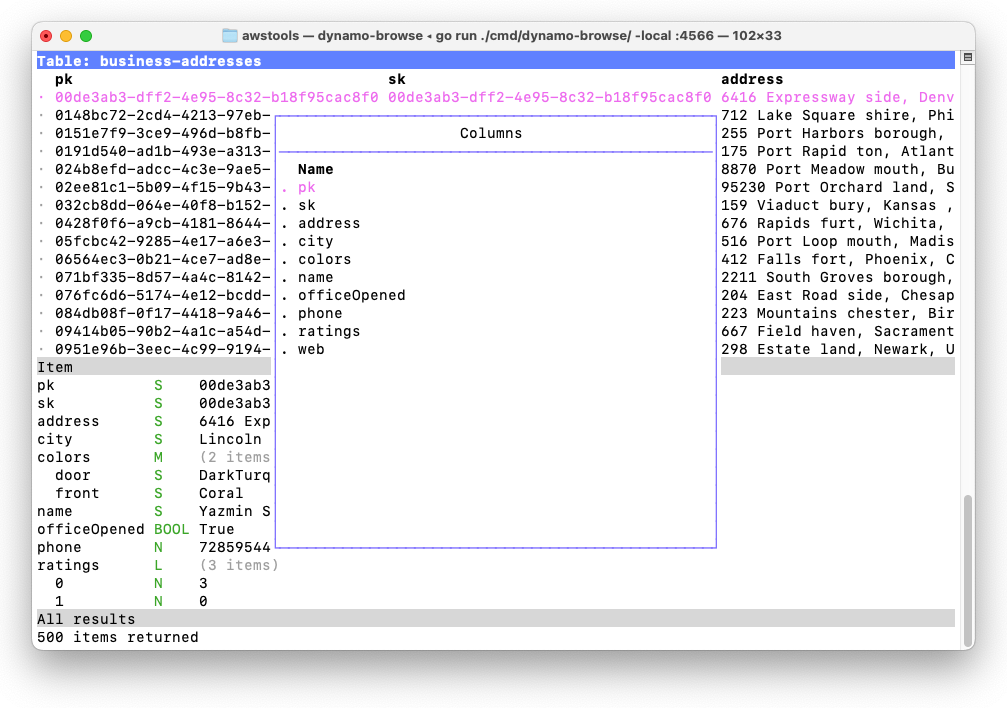
Consider a table full of items that look like the following:
pk           S    00cae3cc-a9c0-4679-9e3a-032f75c2b506
sk           S    00cae3cc-a9c0-4679-9e3a-032f75c2b506
address      S    3473 Ville stad, Jersey , Mississippi 41540
city         S    Columbus
colors       M    (2 items)
  door       S    MintCream
  front      S    Tan
name         S    Creola Konopelski
officeOpened BOOL False
phone        N    9974834360
ratings      L    (3 items)
  0          N    4
  1          N    3
  2          N    4
web          S    http://www.investorgranular.net/proactive/integrate/open-source
Let’s say you’re interested in seeing the city, the door colour and the website in the main table which, by default, would look something like this:
Continue reading → -
Putting the final touches on the website for the upcoming release of Audax Toolset v0.1.0, and I’m finding myself a bit unhappy with it. Given that Dynamo-Browse is the only tool in this “suite”, it feels weird putting together a landing page with a whole lot of prose about this supposed collection of tools. There’s no great place to talk more about Dynamo-Browse right there on the landing page.
Part of me is wondering whether it would be better focusing the site solely on Dynamo-Browse, and leave all this Audax Toolset stuff on the back-burner, at least until (or unless) another tool is made available through this collection. I’m wondering if I’ll need to rearrange the codebase to do this, and spin out the other commands currently in development into separate repositories.
devlog -
Bridging The Confidence Gap
I had to do some production work with DynamoDB this morning. It wasn’t particularly complicated work: run a query, get a couple of rows, change two attributes on each one. I could have used Dynamo-Browse to do this. But I didn’t. Despite building a tool designed for doing these sorts of things, and using it constantly for all sorts of non-prod stuff, I couldn’t bring myself to use it on a production database.
Continue reading → -
Things Dynamo-Browse Need
I’m working with dynamo-browse a lot this morning and I’m coming up with a bunch of usability shortcomings. I’m listing them here so I don’t forget.
The query language needs an
Continue reading →inoperator, such aspk in ("abc", "123"). This works likeinin all the other database services out there, in that the expression effectively becomes `pk = “abc” or pk = “123”. Is this operator supported natively in DynamoDB? 🤔 Need to check that. -
Overlay Composition Using Bubble Tea
Working on a new feature for Dynamo-Browse which will allow the user to modify the columns of the table: move them around, sort them, hide them, etc. I want the feature to be interactive instead of a whole lot of command incantations that are tedious to write. I also kind of want the table whose columns are being manipulated to be visible, just so that the affects of the change would be apparent to the user while they make them.
Continue reading → -
Intermediary Representation In Dynamo-Browse Expressions
One other thing I did in Dynamo-Browse is change how the query AST produced the actual DynamoDB call.
Previously, the AST produced the DynamoDB call directly. For example, if we were to use the expression
pk = "something" and sk ^= "prefix", the generated AST may look something like the following: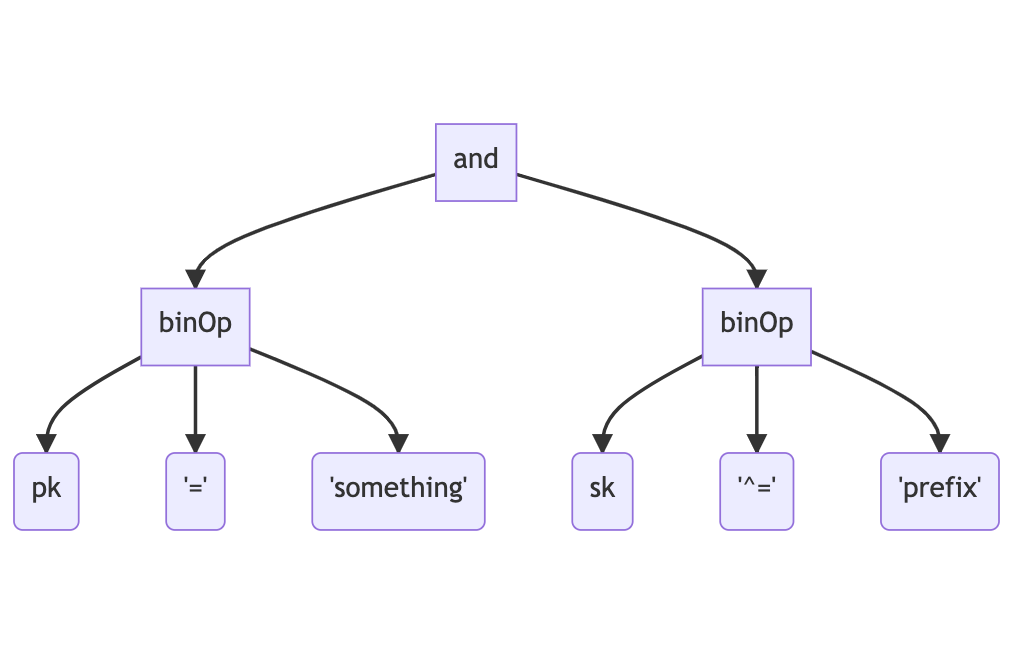
The AST will then be traversed to determine whether this could be handled by either running a query or a scan. This is called “planning” and the results of this will determine which DynamoDB API endpoint will be called to produce the result. This expression may produce a call to DynamoDB that would look like this:
Continue reading → -
Letting Queries Actually Be Queries In Dynamo-Browse
I spent some more time working on dynamo-browse over the weekend (I have to now that I’ve got a user-base 😄).
No real changes to scripting yet. It’s still only me that’s using it at the moment, and I’m hoping to keep it this way until I’m happy enough with the API. I think we getting close though. I haven’t made the changes discussed in the previous post about including the builtin
Continue reading →pluginobject. I’m thinking that instead of a builtin object, I’ll use another module instead, maybe something like the following: -
Finished version 0.0.3 of Audax Toolset yesterday. The code has been ready since the weekend, but it took me Sunday morning and yesterday (Monday) evening to finish updating the website. All done now.
Now the question is whether to continue working on it, or do something different for a change. There are a few people using Dynamo-Browse at work now, so part of me feels like I should continue building features for it. But I also feel like switching to another project, at least for a little while.
I guess we’ll let any squeaky wheels make the decision for me.
devlog -
I’ve been using Dynamo-Browse all morning and I think I’ll make some notes about how the experience went. In short: the command line needs some quality of life improvements. Changing the values of two attributes on two different items, while putting them to the DynamoDB table each time, currently results in too many keystrokes, especially given that I was simply going back and forth between two different values for these attributes.
So, in no particular order, here is what I think needs to be improved with the Dynamo-Browse command line:
- It needs command line completion. Typing out a full attribute name is so annoying, especially considering that you need to be a little careful you got the attribute name right, lest you actually add a new one.
- It needs command line history. Pressing up a few times is so much better than typing out the full command again and again. Such a history could be something that lives in the workspace, preserving it across restarts.
- The
set-attranddel-attrcommands need a switch to take the value directly, rather than by prompting the user to supply it after entering the command (it can still do that, but have an option to take it as a switch as well). I think having a-setswitch after the attribute names would suffice.
Finally, I think it might be time to consider adding more language features to the command line. At the moment the commands are just made up of tokens, coming from a split on whitespace characters (while supporting quotes). But I think it may be necessary to convert this into a proper language grammar, and add some basic control structures to it, such as entering multiple commands in a single line. It doesn’t need to be a super sophisticated language: something similar to the like TCL or shell would be enough at first.
It might be that writing a script would have solved this problem, and it would (to a degree at least). But not everything needs to be a script. I tried writing a script this morning to do the thing I was working on and it felt just so overkill, especially considering how short-lived this script would actually be. Having something that you can whip up in a few minutes can be a great help. It would have probably taken me 15-30 minutes to write the script (plus the whole item update thing hasn’t been fully implemented yet).
Anyway, we’ll see which of the above improvements I’ll get to soon. I’m kinda thinking of putting this project on hold for a little while, so I could work on something different. But if this becomes too annoying, I may get to one or two of these.
devlog -
Thinking About Scripting In Dynamo-Browse
I’ve been using the scripting facilities of dynamo-browse for a little while now. So far they’ve been working reasonably well, but I think there’s room for improvement, especially in how scripts are structured.
At the moment, scripts look a bit like this:
const db = require("audax:dynamo-browse");
const exec = require("audax:x/exec");

db.session.registerCommand("cust", () => {
    db.ui.prompt("Enter UserID: ").then((userId) => {
        return exec.system("/Users/lmika/projects/accounts/lookup-customer-id.sh", userId);
    }).then((customerId) => {
        let userId = output.replace(/\s/g, "");
        return db.session.query(`pk="CUSTOMER#${customerId}"`, {
            table: `account-service-dev`
        });
    }).then((custResultSet) => {
        if (custResultSet.rows.length == 0) {
            db.ui.print("No such user found");
            return;
        }
        db.session.resultSet = custResultSet;
    });
});
This example script — modified from one that I’m actually using — will create a new
Continue reading →custcommand which will prompt the user for a user ID, run a shell script to return an associated customer ID for that user ID, run a query for that customer ID in the “account-service-dev”, and if there are any results, set that as the displayed result set. -
Dynamo-Browse: Using The Back-Stack To Go Forward
More work on Audax toolset. Reengineered the entire back-stack in dynamo-browse to support going forward as well as backwards, much like going forward in a web-browser. Previously, when going back, the current “view snapshot” was being popped off the stack and lost forever (a “view snapshot” is information about the currently viewed table, including the current query and filter if any are set). But I’d need to maintain these view snapshot if I wanted to add going forward as well.
Continue reading → -
Adding Copy-To-Clipboard And Layout Changes In Dynamo-Browse
Spent some more time on dynamo-browse this morning, just a little bit.
Got one new feature built and merged to main, which is the ability to copy the displayed item to the pasteboard by pressing c. This is directly inspired by a feature in K9S, which allows you to copy the logs of a running pod to the pasteboard (I use this feature all the time). The package I’m using to access the pasteboard is github.com/golang-design/clipboard, which seems to offer a nice cross-platform approach to doing this.
Continue reading → -
Adding A Back-Stack To Dynamo-Browse
Spent some more time working on dynamo-browse, this time adding a back-stack. This can be used to go back to the previously viewed table, query or filter by pressing the Backspace key, kind of like how a browser back button works.
This is the first feature that makes use of a workspace, which is a concept that I’ve been thinking about since the start of the project. A workspace is basically a file storing various bits of state that could be recalled in future launches of the tool. A workspace is always created, even if one is not explicitly specified by the user. The workspace filename be set by using the
Continue reading →-wswitch on launch, or if one is not specified, then a new workspace filename within the temp directory is generated. The workspace file itself is a Bolt database, which is a very simple, embeddable key/value store that uses B-Trees and memory-mapped data access. I’m actually using StormDB to access this file, since it provides a nice interface for storing and querying Go structs without having to worry about marshalling or unmarshalling. -
More On Scripting In Dynamo-Browse
Making some more progress on the adding scripting of dynamo-browse. It helps being motivated to be able to write some scripts for myself, just to be able to make my own working life easier. So far the following things can be done within user scripts:
- Define new commands
- Display messages to, and get input from, the user
- Read the attributes of, and set the attributes of, the currently selected row (only string attributes at this stage)
- Run queries and get result sets, which can optionally be displayed to the user
Here’s a modified example of a script I’ve been working on that does most of what is listed above:
Continue reading → -
Scripting In Dynamo-Browse
Making some progress with adding scripting capabilities to dynamo-browse. I’ve selected a pretty full-featured JS interpreter called goja. It has full support for ECMAScript 5.1 and some pretty good coverage of ES6 as well. It also has an event loop, which means that features such as
Continue reading →setTimeoutand promises come out of the box, which is nice. Best of all, it’s written in Go, meaning a single memory space and shared garbage collector. -
Release Preparation & Next Steps
Finally finished the website for the Audax toolset and cut an initial release (v0.0.2). I’ve also managed to get binary releases for Linux and Windows made. I’ve started to work on binary releases for MacOS with the intention of distributing it via Homebrew. This is completely new to me so I’m not sure what progress I’ve made so far: probably nothing. For one thing, I’ll need a separate machine to test with, since I’ve just been installing them from source on the machine’s I’ve been using. Code signing is going to be another thing that will be fun to deal with.
Continue reading → -
A New Name for Audax Tools (nee AWS Tools)
I think I’ve settled on a name for the project I’ve been calling “awstools”. “Settled” is probably a good word for it: I came up with it about a week ago, and dismissed it at first as being pretty ordinary1. But over that time, it’s been slowly growing on me. Also, I’ve yet to come up with any alternatives that are better.
Anyway, the name that I’ve settled on is the Audax Toolset.
Continue reading → -
AWS Tools: Documentation & The Website
Worked a little more on “awstools” (still haven’t thought of a good alternative name for it). I think the “dynamo-browse” tool is close to being in a releasable state. I’ve spent the last couple of days trying to clean up most of the inconsistencies, and making sure that it’s being packaged correctly.
Now it’s documentation writing time. I’m working my way through a very basic website and user guide. It’s been a little while since I’ve written any form of user-level documentation — most of the documents I write have been for other developers I work closely with — and I admit that it feels like a bit of a slog. It might be the tone of writing that I’ve adopted: a little dry and impersonal, trying to walk that fine line between being informative without swamping the reader with big blocks of words. I might need to work on that: no real reason why the documentation needs to be boring to the reader.
Continue reading → -
AWS Tools Dev Diary
A little more work on “awstools” today, mainly on a bit of a cleanup spree to make them suitable for others to use. This generally means fixing up any inconsistencies in how the commands work. An example of this is the
Continue reading →putcommand, which now writes all modified items that are marked to the table (or if there are no marked items, all modified items) instead of just the selected one. This brings it closer to how thedeletecommand works. -
WWDC Videos In Broadtail
Some more work on Broadtail. This time, I added the ability to use it to download Apple WWDC videos.
The way it works is based on the existing RSS feed concept. In order to get the list of videos for a particular WWDC year, you “subscribe” to that by setting up a feed with the new “Apple Developer Videos” type. The external ID is taken from the URL slug of the web-site that Apple publishes the session videos. For example, for WWDC 2021, the external ID would be “wwdc2021”.
Continue reading → -
Feed Rules In Broadtail
Generally, when there’s a video that I’m interesting in watching, I take a look at Broadtail to see if it’s available. When it is, I go ahead and download it.
However, some videos take a long time to download — we’re talking 10 hours or so — and they’re usually published when I’m not looking, like during the night when I’m asleep (thank’s time-zones). So I’d thought it would be nice for Broadtail to kick off the download for me when the video shows up in the feed.
Continue reading → -
Doing a small weekend/week-long project at the moment to track favourite moments in a few podcasts I’m listening to. This is something that I’ve been thinking about for a while, and I’m not entirely sure what compelled me to actually start work on it. Probably because the system I’ve been using so far — a set of timestamped Pocketcast links managed in Pinboard — has been growing quite recently and much of the limitations involved, such as the list being unordered and no skip back 30 seconds available on playback, is start to annoy me. It’s also a chance for a bit of novelty, at least for a few days or so.
It took roughly a day or so to get a small Buffalo web-app up and running which does most of what I want. It just needs some styling and a better way to play the episodes, which is what I’m working on now. I really don’t want to spend more than a week working on this — last thing I need are more projects. But a good thing about this one is that I think the scope is naturally quite small, so no real risk of it blowing out to become too large.
devlog -
Two new awstool commands: one for browsing SSM parameters and one for simply viewing JSON log files. The SSM parameter one was especially handy, as I was dealing with parameter subtrees a lot and doing that in the AWS web console is always a pain. As for the JSON log viewer; well, let’s just say there were one too many log files from Kubernete pods I needed to look at this week.
The pattern for working with state seems to be working. I may need to be a little careful that the state management doesn’t get too unwieldily as I add features and more things that need to be tracked. But at the moment, it seems to be manageable.
devlog -
I’ve been racking my brain trying to best work out how to organise the code for awstools. My goals are to make it possible to have view models composable, have state centralised but also localised, and keep controllers from having too much responsibility. I started another tool, which browses SSM parameters, to try and work this all out.
I think I’ve settled on the following architecture:
- Providers and Services will remain stateless
- State will be managed by controllers
- Operations in controllers are only available through tea.Cmd implementations.
- Updates from controllers will only be available through tea.Msg implementations.
- View models (i.e.
tea.Model) will only know enough state to be able to render themselves. - There will be one master model which will coordinate the communication between controllers and view models. This model will react to messages from the controllers and update the views. It will also react to messages from the views and launch operations on the controllers.
We’ll see how this goes and whether it will scale as additional features are added.
devlog -
More work on the AWS tools, mainly rebuilding the UI framework. Need to rip out all the Operation type stuff, as BubbleTea already does this using messages and commands (see tutorial 2). Also taking some time building some UI models that I can reuse across the various commands, including a few that deal with layout changes.
Also tracked down what was causing that delay when trying to create a new list. It turns out during the call to
list.New(), a bunch of adaptive styles are created, which includes a test to see if the terminal is in light or dark mode. This calls some terminal IO methods which were blocking for a significant amount of time, we’re talking in the order of 10’s of seconds.The good thing is that this check is only made once, so what I did was move the check into the main function. Some preliminary tests indicating that this may work: the lists are consistently being created very quickly again. We’ll see if this lasts.
devlog -
More work on Broadtail this morning. Managed to get the new favourite stuff finished. Favourites are now a dedicated entity, instead of being tied to a feed item. This means that any video can now be favourited, including ones not from a feed. The favourite list is now a top-level menu item as well.
Also found a useful CLI tool for browsing BoltDB files.
devlog -
New AWS Tools Commands
For a while now, I’ve been wanting some tools which would help manage AWS resources that would also run in the terminal. I know in most circumstances the AWS console would work, but I know for myself, there’s a lot of benefit from doing this sort of administration from the command line.
I use the terminal a lot when I’m developing or investigating something. Much of the time while I’m in the weeds I’ve got a bunch of tabs with tools running and producing output, and I’m switching between them as I try to get something working across a bunch of systems.
Continue reading →